SOC online 24/7Breach or outage? Call 858-399-4225

Free guidesinfo@alpiba.comMon–Fri, 7am–7pm PT

Alpiba

Contact Alpiba

Talk to a senior engineer, not a call queue.

Active incident, migration scoping or a security assessment: call us, or send a request and we'll reply within 12–24 hours.

Active incident?

Breach, outage or ransomware?

Call now. Managed clients get 24/7 coverage. Don't power anything off or pay anyone before you talk to us.

858-399-4225

858-399-4225Mon–Fri, 7am–7pm PT · 24/7 for managed clients
info@alpiba.comReply within 12–24 hours
San Diego, CAOn-site across San Diego County, remote everywhere
Roopa, founder of Alpiba

SMBs deserve a strategic technology partner, without enterprise complexity or cost.RoopaFounder, Alpiba

Office hours

Monday to Friday, 7am to 7pm Pacific Time

24/7 security monitoring and support for managed clients.

Send a request

How can we help?

A senior engineer reads every request. Tell us what's going on and we'll take it from there.

Fields marked * are required. By submitting, you agree that Alpiba may contact you about your request. We reply within 12–24 hours; for an active incident, call 858-399-4225.

What happens next

From first message to a clear plan.

  1. We reply within 12–24 hours

    A senior engineer reviews your request and gets back to you, usually the same business day.

  2. Free 30-minute assessment

    We map your risks, quick wins and current setup. No obligation, no sales pressure.

  3. A right-sized plan

    A scoped roadmap with flat per-user pricing for managed services, or a clear quote for a project.

What we do

Fifteen services. One team to call.

All services
People working at laptops across a large open office

Managed IT

Managed IT & White-Glove Support

Your single point of contact for all technology, with a tailored helpdesk and on-site support backed by clear SLAs.

A close view of a glowing circuit board

Cybersecurity

Cybersecurity & Ransomware Defense

24/7 monitoring, threat hunting and rapid incident response that contains attacks before they impact your business.
A bright office with glass walls and meeting rooms

Cloud & Productivity

Office 365 / Microsoft 365

Certified onboarding, migration, security hardening and ongoing administration by Microsoft-certified professionals.

A close view of a computer circuit board

Infrastructure & Continuity

Backups & Business Continuity

Immutable backups, tested restore plans and disaster recovery playbooks so your business stays online.

A team in a working session around a conference table

Compliance & Risk

Compliance Readiness

Design, implement and evidence the controls auditors and insurers ask for, and keep the audit trail ready.

From our founder

“SMBs deserve a strategic technology partner, without enterprise complexity or cost.”

Roopa · Founder, Alpiba · former Accenture advisor

Alpiba is founder-led and San Diego based. Callers reach a senior engineer, not a call queue.

Roopa, founder of Alpiba, standing outdoors in a white polka-dot dress

Before you reach out

Before you reach out.

5 min readBy the Alpiba teamUpdated October 15, 2026

On this page

When you contact a San Diego IT support company, you want to know three things: who will answer, how fast, and what to say so the first reply is actually useful. This page covers all three, plus what to do in the first hour if you're dealing with a security incident right now.

The short version: call 858-399-4225 for anything urgent, Monday to Friday from 7am to 7pm Pacific, or use the form or info@alpiba.com for everything else. Managed clients have 24/7 support, and every inquiry gets a reply within 12 to 24 hours.

Active incident? Your first-hour checklist

Make two calls first

Call us at 858-399-4225 and, if you have cyber insurance, your insurer's incident hotline. Insurers often expect early notice, and some require approved responders. For managed clients, our documented containment playbook is triggered within the first hour of a ransomware or breach event.

  1. Isolate affected devices

    Unplug network cables and turn off Wi-Fi on anything that looks infected. Only power a device off if you can't disconnect it, because memory and logs help the investigation.

  2. Don't pay, delete or wipe

    Don't reply to a ransom demand, delete suspicious files or start rebuilding machines. Each can destroy evidence or make recovery harder.

  3. Preserve evidence

    Photograph ransom notes and error messages, keep suspicious emails without forwarding them around, and write a timeline of what you saw, when and on which device.

  4. Secure accounts from a clean device

    If email accounts may be compromised, change passwords from a device you trust, confirm MFA is on and look for new mail-forwarding rules.

  5. Control the message

    Tell staff what to do and what not to say. Hold public statements until the facts are clear, since notification duties depend on what happened.

If it's email or payment fraud

  • Call your bank first if money has moved. Ask it to recall or freeze the transfer. With wire fraud, minutes matter more than paperwork.
  • Report it. File a complaint with the FBI's Internet Crime Complaint Center (IC3). Your bank or insurer may ask whether you have.
  • Verify by phone. Contact the real vendor or client on a number you already trust, never one taken from the suspicious email, and work out together which side was compromised.
  • Check the mailbox. Call us to review the account for forwarding rules, unfamiliar sign-ins and any other messages the attacker sent in your name.

These lists are practical first aid, not legal advice. For managed clients, we follow the documented containment playbook. If your business doesn't yet have an incident response plan, writing one is worth doing once things are calm.

Ways to reach us, and when to use each

Contact options
ChannelBest forWhat to expect
Phone: 858-399-4225Active incidents, outages and anything you'd rather talk throughA senior engineer, not a call queue. Office line Monday to Friday, 7am–7pm Pacific; 24/7 for managed clients
Email: info@alpiba.comQuestions, background documents or anything you'd like in writingA reply within 12 to 24 hours
The request formNew projects, pricing questions, a second opinion or a general inquiryA reply within 12 to 24 hours
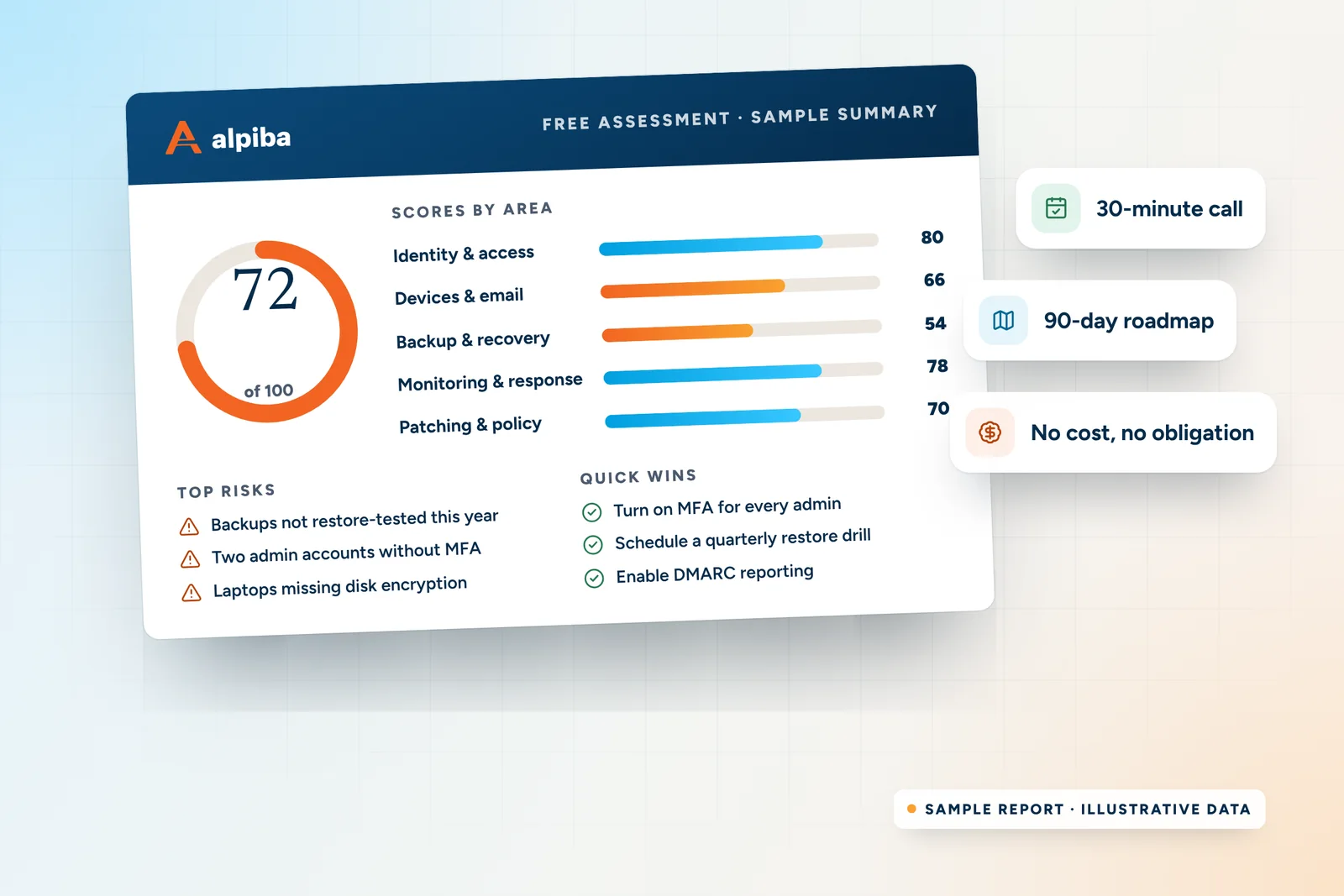
Free assessment requestA structured first conversation about risks, quick wins and a roadmapA reply within 12 to 24 hours to schedule it

A simple rule: if waiting a day would cost you money or data, call. Otherwise, write. For a structured first conversation, you can also request a free 30-minute assessment directly.
Sample Alpiba assessment summary: an overall score of 72 out of 100, scores for five security areas, top risks and quick wins
Sample assessment summary. Illustrative data.

What to include in your message

Whenever you contact a San Diego IT support company, including us, a few details let the first reply answer your question instead of asking five more. You don't need technical language. Describe what you see and what you need.

  • Your company name, rough headcount and location, such as Kearny Mesa, La Jolla or Oceanside
  • What you need: support, a project, pricing, a second opinion or an assessment
  • What you use today: Microsoft 365 or Google Workspace, any servers, and your current IT provider
  • Any deadline: an audit, insurance renewal, office move, new hires or a contract end date
  • For a problem: what happened, when it started, who is affected and any error messages
  • The best way and time to reach you

Messages that get a useful first reply

New managed IT

“We're a growing team in Sorrento Valley on Google Workspace with no IT staff. We'd like a free assessment and to understand how per-user pricing would work for us.”

A migration project

“We need to move from on-premises Exchange to Microsoft 365 before our server is retired. Can you scope the migration and tell us what you'd need from us?”

A second opinion

“Our cyber insurance renewal asks about EDR, immutable backups and 24/7 monitoring. We're not sure what we have and want help checking before we answer.”

Keep secrets out of the form

Please don't send passwords, patient details, client files or payment data by form or email. If sensitive information is needed later, ask us for a secure way to share it.

What to expect after you submit

  • Who reads it. A senior engineer reviews your request, so the reply deals with your actual situation rather than a script.
  • When you'll hear back. Within 12 to 24 hours. If something turns urgent while you wait, call 858-399-4225 rather than sending a second message.
  • What the reply looks like. A direct answer when we can give one, or a few clarifying questions and times for a call when we need context.
  • What it won't be. A hard sell. Next steps, including the free 30-minute assessment, come with no obligation and no sales pressure.

Existing clients and new inquiries

The best route depends on whether you already work with us.

Managed clients

Use the support routes agreed during onboarding so requests are tracked from the start, and call for anything urgent. You have 24/7 monitoring and support, and quarterly reviews are the place for bigger roadmap and budget questions.

New inquiries

Call, email or use the form, and expect a reply within 12 to 24 hours. The usual next step is a free 30-minute assessment, with no obligation.

In-house IT teams

If you run IT internally, say so in your message. We'll talk engineer to engineer about where co-managed IT could take pressure off your team.

Where we work

Alpiba is a San Diego company. We work on-site and remotely across San Diego County, from North County and the coast to the South Bay and East County. Teams and offices outside the county are supported remotely, with 24/7 monitoring for managed clients.

If you're comparing options before you contact a San Diego IT support company, our service area page shows where we work on-site, and what makes Alpiba different explains how we approach support.

Illustrated map of San Diego County showing Alpiba on-site service areas: Downtown, Mission Valley, Kearny Mesa, National City, Chula Vista, La Jolla, UTC / University City, Sorrento Valley, Torrey Pines, Del Mar, Carlsbad, Encinitas, Oceanside, Escondido and Poway
Where we support clients on-site. Illustrated map, approximate.

FAQ

Contact questions, answered.

Straight answers to the questions we hear most. Still curious? Talk to a senior engineer.

How do I contact Alpiba?

There are three ways: phone 858-399-4225, email info@alpiba.com or use the request form on this page. The phone line is best for anything urgent and is staffed Monday to Friday, 7am to 7pm Pacific, with 24/7 support for managed clients. Email and form requests get a reply within 12 to 24 hours from a senior engineer.

What are Alpiba's office hours?

The office line is open Monday to Friday, 7am to 7pm Pacific Time. Managed clients also have 24/7 monitoring and support, so security alerts and urgent issues are handled around the clock, including nights, weekends and holidays. Email and form requests sent at any hour are answered within 12 to 24 hours.

How quickly will Alpiba reply to my message?

Within 12 to 24 hours, for every email and form request. Requests are reviewed by a senior engineer, so the reply addresses your actual question rather than a script. If your issue is urgent, such as an outage or a suspected breach, call 858-399-4225 instead of waiting for an email reply.

Will I reach a real engineer when I call?

Yes. Calls go to a senior engineer rather than a call queue, and that's true for active incidents, migration scoping and security assessments alike. That means you describe the problem once, to someone who understands it, instead of repeating yourself to several people before anyone technical gets involved.

What should I do if we're hit by ransomware right now?

Call 858-399-4225 immediately, then isolate affected devices by unplugging network cables or turning off Wi-Fi. Don't pay the ransom, delete files or wipe machines, because that can destroy evidence. Check your cyber insurance policy for an incident hotline, and write down what you saw and when. Managed clients have a containment playbook triggered within the first hour.

Does Alpiba offer 24/7 support?

Yes, for managed clients. Our human-staffed SOC watches managed environments day and night, and its average first response is under 15 minutes. Managed clients have 24/7 support for urgent issues. The office line for general inquiries and new business is staffed Monday to Friday, 7am to 7pm Pacific.

Where is Alpiba located?

Alpiba is San Diego-based. Our engineers work on-site at client locations across San Diego County, from North County to the South Bay, and support teams elsewhere remotely with 24/7 monitoring. To reach us, phone 858-399-4225 or email info@alpiba.com; every inquiry gets a reply within 12 to 24 hours.

What should I include when I contact a San Diego IT support company?

Include your company name, rough headcount and location, what you need, the platforms you use, such as Microsoft 365 or Google Workspace, and any deadlines like an audit or insurance renewal. For a problem, describe what happened, when it started and who is affected. Leave out passwords and sensitive data; a first message never needs them.

Can I get a quote without a long sales process?

Yes. Managed services use flat, per-user monthly pricing that we scope after a free 30-minute assessment with a senior engineer, so there's one focused conversation rather than a drawn-out sales cycle. Projects such as migrations or network refreshes get a clear quote before work starts. Either way, there's no obligation and no sales pressure.

Can existing clients use the contact form for support?

They can, but it isn't the fastest route. Managed clients should use the support routes agreed during onboarding, so requests are tracked from the start, and call 858-399-4225 for anything urgent. The contact form is designed for new inquiries, assessments and general questions, and it's answered within 12 to 24 hours.

Do you work with companies that already have IT staff or a provider?

Yes. If you have in-house IT staff, we can work alongside them in a co-managed model, adding 24/7 security monitoring, specialist depth and after-hours coverage. If you have an outside provider and want a second opinion or a change, a free 30-minute assessment gives you an independent view without any obligation.

Is it safe to email documents or system details?

General details are fine, but please don't email passwords, patient records, client files or payment data. A first conversation rarely needs anything sensitive. If sensitive documents are needed later, such as network diagrams or a completed security questionnaire, ask us for a secure way to share them rather than attaching them to an ordinary email.

Call Free assessment