SOC online 24/7Breach or outage? Call 858-399-4225

Free guidesinfo@alpiba.comMon–Fri, 7am–7pm PT

Alpiba

Free · 30 minutes · No obligation

Your free IT & security assessment.

In about 30 minutes we map your current risks, identify quick wins and outline a right-sized IT and security roadmap for your business. No obligation and no sales pressure.

What we review

A clear picture of where you stand.

Identity & access

MFA coverage, admin rights and how quickly access is removed when people leave.

Devices & email

Endpoint protection, patching and how well email is filtered and authenticated.

Backups & recovery

Where backups live, whether they are immutable and when a restore was last tested.

Monitoring & response

Who watches alerts after hours and what happens when something gets through.

Cloud & productivity

Microsoft 365 or Google Workspace configuration, sharing and licensing.

Compliance & insurance

Upcoming audits, customer questionnaires and cyber insurance renewals.

What you get

Three things you can act on.

Your top risks

The gaps most likely to cause an outage, breach or failed audit, in plain English.

Quick wins

Fixes you can make right away, whether or not you work with us.

A right-sized roadmap

A plan sized to your operations, budget and growth, with flat per-user pricing if you want our help.
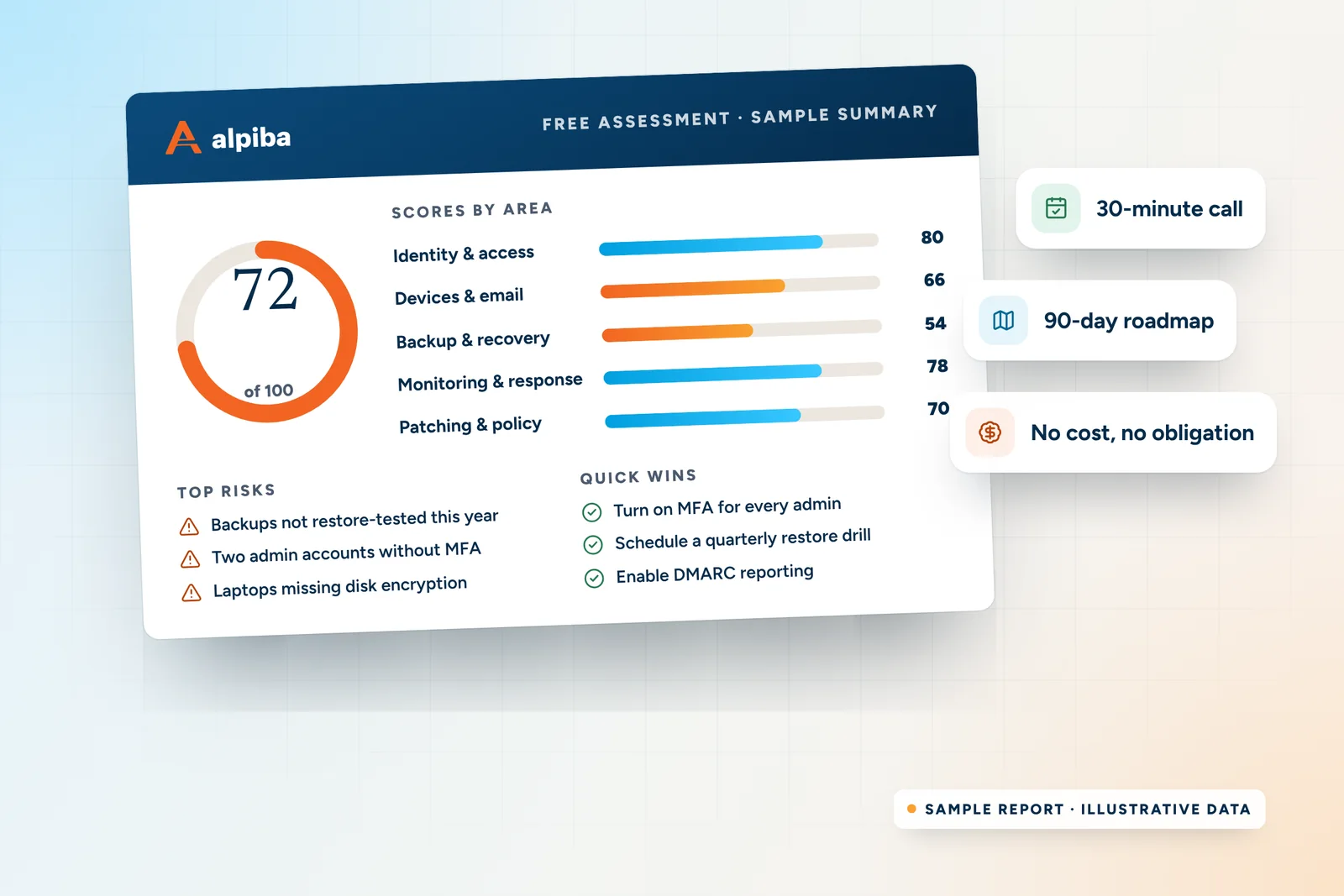
Sample Alpiba assessment summary: an overall score of 72 out of 100, scores for five security areas, top risks and quick wins
A sample assessment summary: scores by area, top risks and quick wins. Illustrative data.

Book your assessment

Tell us a little about your business.

We reply within 12–24 hours to schedule a time that works for you.

  • 30 minutes, by phone or video
  • No obligation and no sales pressure
  • A senior engineer, not a salesperson
Roopa, founder of Alpiba

SMBs deserve a strategic technology partner, without enterprise complexity or cost.RoopaFounder, Alpiba

858-399-4225Mon–Fri, 7am–7pm PT · 24/7 for managed clients
info@alpiba.comReply within 12–24 hours

Fields marked * are required. By submitting, you agree that Alpiba may contact you about your request. We reply within 12–24 hours; for an active incident, call 858-399-4225.

Where assessments lead

The services clients start with most.

All services
People working at laptops across a large open office

Managed IT

Managed IT & White-Glove Support

Your single point of contact for all technology, with a tailored helpdesk and on-site support backed by clear SLAs.

A close view of a glowing circuit board

Cybersecurity

Cybersecurity & Ransomware Defense

24/7 monitoring, threat hunting and rapid incident response that contains attacks before they impact your business.

A bright office with glass walls and meeting rooms

Cloud & Productivity

Office 365 / Microsoft 365

Certified onboarding, migration, security hardening and ongoing administration by Microsoft-certified professionals.

A close view of a computer circuit board

Infrastructure & Continuity

Backups & Business Continuity

Immutable backups, tested restore plans and disaster recovery playbooks so your business stays online.

A team in a working session around a conference table

Compliance & Risk

Compliance Readiness

Design, implement and evidence the controls auditors and insurers ask for, and keep the audit trail ready.

In depth

Everything to know about the free assessment.

7 min readBy the Alpiba teamUpdated October 15, 2026

On this page

Our free IT assessment in San Diego is a 30-minute working conversation with a senior engineer about how your business runs, where the risks are and what to fix first. It's useful whether or not you ever become a client, because the quick wins are yours to keep.

This page explains what we cover in more depth, what you leave with, who the assessment suits, how to prepare and what happens afterwards. If you've already requested a time, it's also a good way to get the most from the call.

What we cover, and the questions we ask

The agenda keeps us on time; the questions are where the value is. Here's a sample of what we ask in each area and what we're listening for.

Example questions by area
AreaExample questionsWhat we're listening for
Goals and concernsWhat prompted you to book? What's changing this year: new hires, a new location, an audit or a major customer?The business goals your roadmap has to serve
Identity and accessIs MFA on for every account, including admins and shared mailboxes? How quickly is access removed when someone leaves?Whether one stolen password could open everything
Devices and emailWhat protects your laptops today, and who sees its alerts? Has anyone received a fake invoice or a payment-change request?How an attack would most likely start
Backups and recoveryWhere do backups live, and could ransomware reach them? When did you last restore a full system, and how long did it take?How long you'd really be down and how much data you'd lose
Cloud and networkDo you run Microsoft 365, Google Workspace or something else, and who administers it? Do guests share a network with staff?Configuration gaps, oversharing and wasted licenses
Compliance and insuranceIs an audit, customer questionnaire or cyber insurance renewal coming up? Who has asked you about security lately?Which controls you need to prove, and by when
Local resilienceIf SDG&E shut off power to your building for a day, what would stop? Where do your people work in a normal week?Whether your plans hold up on a bad San Diego day
“Not sure” is a good answer

You don't need every answer. Gaps in what anyone knows are findings too, and they're often where the first quick win comes from.

What you leave with

By the end of the call you'll have three things in plain English: your top risks, the quick wins worth doing right away and a right-sized roadmap. Here's what those look like in practice.

Typical quick wins

  • Turning on MFA for the accounts that still don't have it, starting with admins
  • Removing accounts that belong to people who have left
  • Publishing SPF, DKIM and DMARC records so your domain is harder to spoof
  • Scheduling a full restore test and timing how long it takes
  • Moving guests onto their own Wi-Fi network
  • Finding licenses that are paid for but assigned to nobody

What “right-sized” means

A right-sized roadmap fits your operations, budget and growth plans. A ten-person office doesn't need an enterprise security program, and a practice handling patient records can't skip the safeguards HIPAA expects. We'll say what to do first, what can wait and what you may not need at all.

If you'd like our help, we scope a plan with flat per-user monthly pricing and no surprise line items. If you'd rather act on it yourself or with your current provider, that's a good outcome too.

Alpiba's four-step process: 1. Discovery & Analysis, 2. Solution Design, 3. Implement and 4. Protect & Optimize.
How Alpiba works, from first call to fully protected.

How it differs from a deeper assessment

The free assessment is a starting point, not an audit. When a topic needs more depth, these are the usual next steps.

Free 30-minute assessment

A conversation with a senior engineer about your setup, goals and concerns. You leave with top risks, quick wins and a right-sized roadmap.

Vulnerability assessment

Scanning and review of your devices, cloud settings and networks to show what an attacker would see. You get findings ranked by risk and a remediation plan.

Compliance gap assessment

A control-by-control review against a framework such as SOC 2 or HIPAA, for when an auditor, customer or regulator wants proof. You get a plan to close the gaps, ordered by risk and audit timing.

Learn more about vulnerability assessments and compliance readiness. During the free assessment, we'll tell you whether either is worth doing now.

Who the assessment is for

  • Owners and managers without IT staff. You depend on technology every day, nobody owns it full time, and you'd like a clear picture before something breaks.
  • Teams with an in-house IT person. Your IT lead wants a second pair of eyes, after-hours cover or specialist depth, which often leads to a conversation about co-managed IT.
  • Businesses facing a deadline. An audit, a customer security questionnaire, an insurance renewal or a migration date is coming, and you need to know what's missing.
  • Anyone frustrated with their current IT. Slow responses, surprise bills or unanswered security questions. We'll say honestly what we'd change and what's already fine.

We run every free IT assessment in San Diego the same way, whether you're a five-person office in Del Mar or a multi-site team spread from Oceanside to National City. It's especially valuable for regulated and data-sensitive businesses, including the industries we focus on.

Dealing with an active incident?

Don't wait for a scheduled call. Phone 858-399-4225 to reach a senior engineer. The assessment is for planning; an incident needs a response now.

How to prepare in 15 minutes

Nothing formal is required. If you have a few minutes beforehand, gathering these details makes the conversation sharper and the roadmap more accurate.

  • Roughly how many people, laptops, desktops and servers you have
  • Your email and file platform: Microsoft 365, Google Workspace or something else
  • Who handles IT today, and what their contract or job description covers
  • Where backups live and when a restore was last tested, if you know
  • Any recent incidents, near misses or convincing phishing emails
  • Upcoming deadlines: audits, insurance renewals, office moves or hiring plans
  • A recent insurance application or customer security questionnaire, if you have one
  • The two or three IT frustrations your team mentions most
Take the self-check first

The security health check takes about two minutes and scores five areas out of 20 each. Bring your result and we'll start where it's lowest.

Please don't include passwords, patient details or client files in your request. None of that is needed to book the assessment, and sensitive data is safer kept out of email and web forms.
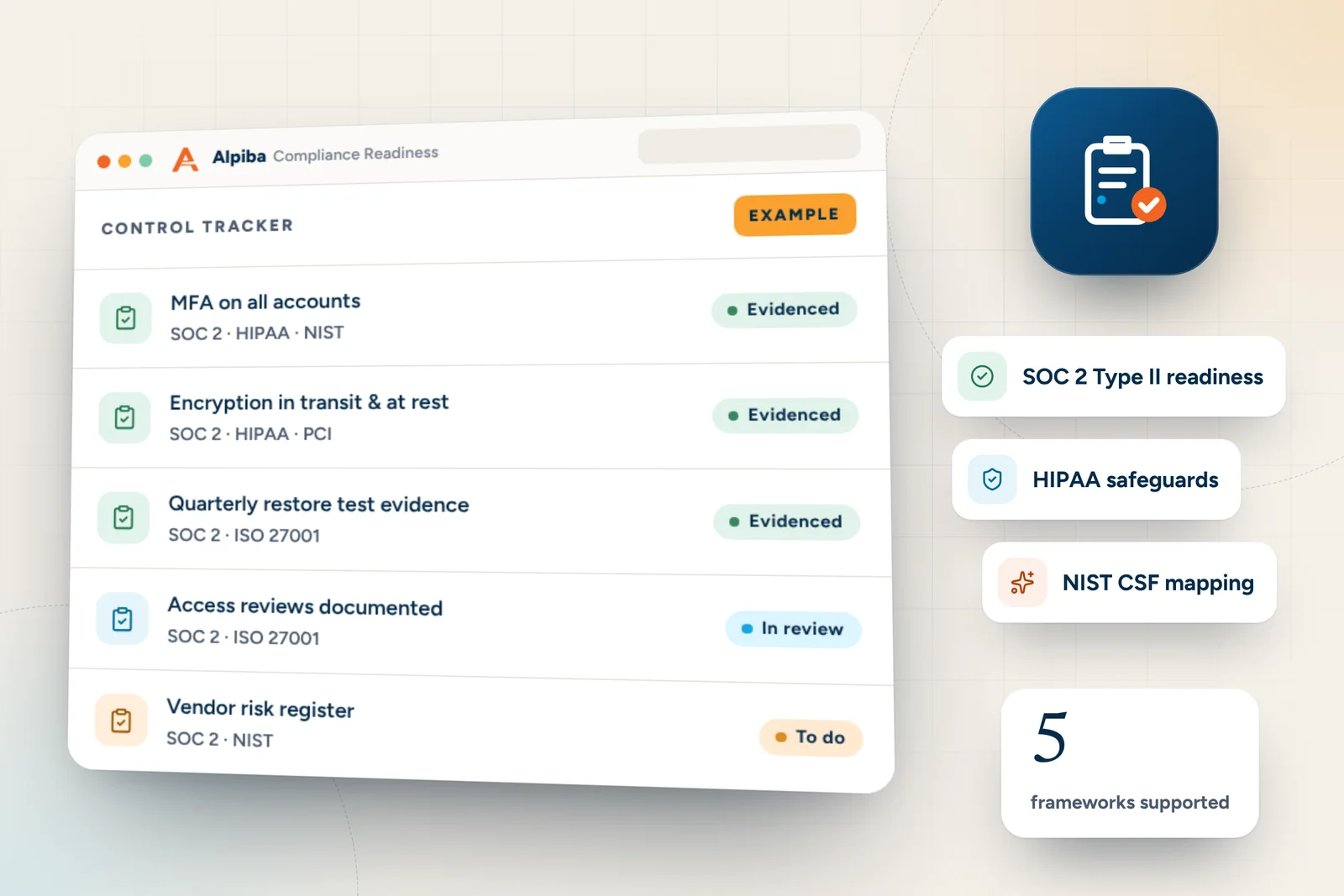
Example control tracker from Alpiba Compliance Readiness, showing mfa on all accounts, encryption in transit & at rest and quarterly restore test evidence
Example control tracker for Compliance Readiness. Illustrative data, not from a real client.

What happens after you request a time

  1. We reply within 12–24 hours

    We get back to you to agree a time that suits you. If anything becomes urgent in the meantime, call instead.

  2. We have the conversation

    A senior engineer, not a salesperson, works through your goals and the areas above in 30 minutes.

  3. You get our honest read

    Your top risks, quick wins and a right-sized roadmap, explained without jargon.

  4. You decide

    If you'd like help, we scope a plan with flat per-user pricing. If not, there's no obligation and nothing more to do.

If you go ahead, the assessment becomes the starting point for Discovery & Analysis, the first step of our four-step process, so what you've told us carries straight into planning.

Questions worth asking us

An assessment works both ways. These are fair questions to put to any provider, with our answers so you can hold us to them.

Questions to ask, and our answers
Ask usOur answer
How fast do you respond?Our human-staffed SOC averages a first response under 15 minutes, around the clock, and triggers a containment playbook within the first hour of a ransomware or breach event.
Who will we deal with?A single point of contact, and senior engineers rather than a call queue when you phone.
How do you know backups work?Backups are immutable and off-site, with restore drills every quarter. Our typical recovery time objective is under 4 hours.
How does pricing work?Flat, per-user monthly pricing with no surprise line items. Projects are quoted before work starts.
Are you certified in the frameworks you mention?No. Framework references describe readiness for client environments, not certification of Alpiba. Independent auditors issue the reports.
Can you work with our IT person?Yes. We can be your full outsourced IT department or work alongside your team in a co-managed model.

Why there's no sales pressure

A managed IT relationship only works when both sides are clear on scope, expectations and price. Pressure produces the opposite, so we leave it out.

It's also how Alpiba was set up. Our founder, Roopa, spent years advising large enterprises at Accenture before founding Alpiba on a simple conviction: “SMBs deserve a strategic technology partner, without enterprise complexity or cost.” A partner starts by listening.

  • You talk to a senior engineer, not a salesperson
  • There's no obligation to buy anything, now or later
  • Quick wins are yours to use, with us or without us
  • If we're not the right fit, we'll tell you
Illustration of the San Diego skyline at sunset, with downtown towers, the bridge across the bay, sailboats and palm trees
San Diego, where Alpiba is based.

FAQ

Assessment questions, answered.

Straight answers to the questions we hear most. Still curious? Talk to a senior engineer.

What happens during the free IT assessment?

A senior engineer spends about 30 minutes with you on your goals and concerns, then works through identity and access, devices and email, backups and recovery, cloud and network, and any compliance or insurance deadlines. We finish with your top risks, quick wins and a right-sized roadmap. There's no obligation and no sales pressure.

Is the free IT assessment in San Diego really free?

Yes. There's no fee, no obligation and no sales pressure. The free IT assessment in San Diego exists so you can see your risks clearly and decide what to do next, with or without us. If you'd like help afterwards, we scope a plan with flat per-user monthly pricing; if not, the quick wins are still yours.

What should I prepare before the assessment?

Nothing formal is needed. It helps to know roughly how many people and devices you have, which email platform you use, who handles IT today, where backups live and whether any audits, insurance renewals or office moves are coming up. Taking the two-minute security health check beforehand gives the conversation a useful starting point.

Who will I speak with?

You'll speak with a senior engineer, not a salesperson. The person asking about your backups or Microsoft 365 setup understands the technology and can tell you whether something is a real risk or a minor clean-up. Our engineers are Microsoft 365 and Google Workspace certified, so platform questions get specific answers.

How soon can we schedule the assessment?

We reply to every request within 12 to 24 hours to agree a time that works for you. If your situation is urgent, such as a suspected breach or a system outage, don't wait for a reply: call 858-399-4225, Monday to Friday from 7am to 7pm Pacific, to reach a senior engineer directly.

Do you need passwords or access to our systems?

No passwords are needed to book or prepare. The assessment is a structured conversation about how your systems are set up, so please keep passwords, patient details and client files out of the request form and email. If a deeper technical review makes sense later, such as a vulnerability assessment, we agree its scope and access with you first.

Will you try to sell me managed IT?

No. We'll tell you what we see and what we'd recommend, and if our services fit, we'll explain how they would work and how per-user pricing is scoped. The decision is entirely yours. If you use the quick wins on your own or with your current provider, that's fine with us.

What if we already have an IT provider?

The assessment is still useful. An independent view often confirms what's working and highlights gaps that are easy to miss from the inside, such as untested restores or exceptions to MFA. You can share the quick wins with your current provider, and where there's an internal IT team, co-managed support is worth discussing too.

Is the assessment worthwhile for a very small business?

Yes. Small teams often have the most to gain, because one compromised mailbox or failed laptop can stop the whole business. The roadmap is right-sized, so a five-person office gets practical priorities like MFA, managed EDR and tested backups rather than an enterprise program it doesn't need. The conversation takes the same 30 minutes either way.

Can the free assessment tell us if we're HIPAA or SOC 2 ready?

It can show the gaps most likely to matter and recommend which framework to prioritize, but it isn't a full readiness review. A compliance gap assessment checks your environment control by control. SOC 2 reports come from independent auditors and HIPAA compliance stays with your organization; our role is to help implement and evidence the technical controls.

Do you offer assessments outside the city of San Diego?

Yes. We work with businesses across San Diego County, from Escondido to Chula Vista, and with teams elsewhere through remote support and 24/7 monitoring. The free 30-minute assessment works the same way wherever you're based: the same agenda, the same plain-English findings and always a senior engineer on the call.

What happens after the free assessment?

You decide what's next. You can act on the quick wins yourself, or ask us to scope managed IT, co-managed support or a project such as a Microsoft 365 migration. If you go ahead, we move into Discovery & Analysis and Solution Design, then implement changes in tight windows with minimal disruption.

Call Free assessment