SOC online 24/7Breach or outage? Call 858-399-4225

Free guidesinfo@alpiba.comMon–Fri, 7am–7pm PT

Alpiba

Service area

Rooted in San Diego. Ready for anywhere.

On-site support across San Diego County from people who know the region, with remote support and 24/7 monitoring for distributed teams and offices outside the area.


San Diego skyline across the bay on a clear day

Where we work on-site

Across San Diego County.

Our team supports offices, labs, clinics and warehouses throughout the county. Not on the list? Ask us; remote support and 24/7 monitoring work anywhere.

Central San Diego

  • Downtown
  • Mission Valley
  • Kearny Mesa
  • National City
  • Chula Vista

Coast & North City

  • La Jolla
  • UTC / University City
  • Sorrento Valley
  • Torrey Pines
  • Del Mar

North County

  • Carlsbad
  • Encinitas
  • Oceanside
  • Escondido
  • Poway

How support works

On-site, remote and around the clock.

On-site support

Hands-on help across San Diego County for network work, new offices, hardware and anything that needs a person in the room.

Remote support

Fast fixes for most issues without waiting for a visit, under clear service-level agreements.

24/7 monitoring

Our SOC watches managed clients day and night, wherever they are, with an average first response under 15 minutes.

Hours & contact

Reach a senior engineer, not a call queue.

Office line: Monday to Friday, 7am to 7pm Pacific Time. Managed clients get 24/7 security monitoring and support.

858-399-4225Mon–Fri, 7am–7pm PT · 24/7 for managed clients
info@alpiba.comReply within 12–24 hours
San Diego, CAOn-site across San Diego County, remote everywhere

Who we support on-site

Labs, firms, clinics and warehouses.

All industries
A scientist using a microscope at a laboratory bench

Biotech

Protect research IP, lab instruments and audit-ready data.

IP protection · Lab uptime

Law books on dark library shelves

Legal

Confidential files and secure access from anywhere.

Confidentiality · Remote access

An empty dental treatment room with a chair, monitor and cabinets

Dental

HIPAA-aligned safeguards for patient records.

HIPAA · Patient data

From our founder

“SMBs deserve a strategic technology partner, without enterprise complexity or cost.”

Roopa · Founder, Alpiba · former Accenture advisor

Alpiba is based in San Diego. We come on-site when the work needs a person in the room, and we answer the phone when it matters.

Roopa, founder of Alpiba, standing outdoors in a white polka-dot dress

In depth

IT support across San Diego County, explained.

7 min readBy the Alpiba teamUpdated October 15, 2026

On this page

Alpiba provides IT support across San Diego County, from the coast to East County and from North County to the border. We're based in San Diego, we come on-site when the work needs a person in the room, and we handle everyday requests remotely, backed by 24/7 monitoring for managed clients.

This page explains how on-site and remote support fit together, the communities and kinds of businesses we serve, how we support multi-site and hybrid teams, and how we plan for the risks that come with doing business here, from Santa Ana winds to earthquakes.

How on-site and remote support work together

Most IT problems don't need a visit. A locked account, a misbehaving laptop or a sharing permission in Microsoft 365 is usually fixed faster remotely than by waiting for an engineer to drive across the county. On-site time is reserved for work that genuinely needs someone there.

Where different kinds of work usually happen
Type of workUsually handledWhy
Passwords, account access and MFA issuesRemoteFaster to fix without waiting for a visit
Laptop and software problemsRemote firstRemote tools reach the device wherever it is
Security alerts and incidentsRemote, 24/7Our SOC can isolate a device or disable an account without being on site
Network, Wi-Fi and firewall changesRemote or on-siteConfiguration is often remote, but cabling and equipment need hands
New offices, moves and device rolloutsOn-siteEquipment has to be installed, tested and labeled
Server rooms and network closetsOn-sitePhysical checks, installs and documentation

Either way, requests run through the same helpdesk and the same documentation, so the engineer who visits knows what has already been tried. That mix is how we keep IT support across San Diego County fast, whether your office is in Little Italy or Escondido.

Both kinds of support are part of our managed IT and white-glove support, along with unlimited helpdesk tickets and quarterly business reviews.

The regions we serve

San Diego County is large and varied, and so are its businesses. Here's how we think about the region, with the kinds of businesses common in each area.

Communities across San Diego County
RegionCommunitiesCommon businesses
Central San DiegoDowntown, Little Italy, Mission Valley, Kearny Mesa, Point LomaLaw and professional services, hospitality, medical offices and maritime suppliers
North CityUTC, La Jolla, Sorrento Valley, Torrey Pines, Mira Mesa, Carmel Valley, Rancho BernardoBiotech and life sciences, research and software companies
North County coastalDel Mar, Solana Beach, Encinitas, Carlsbad, OceansideTechnology, life sciences, hospitality and professional practices
North County inlandEscondido, San Marcos, Vista, PowayManufacturing, distribution, healthcare and family-owned businesses
East CountyLa Mesa, El Cajon, Santee, Lakeside, AlpineDental and medical practices, trades, light industrial and retail
South BayChula Vista, National City, Otay Mesa, Imperial BeachLogistics and cross-border trade, manufacturing, healthcare and retail

The communities differ, but their IT needs fall into a few clear patterns.

Research corridors

Around Torrey Pines, Sorrento Valley and UTC, biotech and life sciences teams need lab instruments isolated on their own network segments and research data locked down. Instrument PCs that can't simply be patched make careful on-site network work especially important.

Professional offices

From Downtown San Diego to Del Mar and Carmel Valley, law firms, accountants and agencies run on confidentiality and email. Their priorities are MFA, defenses against payment-fraud email and secure remote access for hybrid staff.

Industrial parks and logistics

In Otay Mesa, Vista, San Marcos, Poway and Kearny Mesa, manufacturers and distributors depend on warehouse Wi-Fi, scanners, connected equipment and links between sites. Downtime stops shipping, so segmentation, monitoring and tested backups matter as much as the helpdesk.

Practices and clinics

Dental practices across East County, the South Bay and inland North County need imaging and practice software running all day while patients are in the chair. They also need HIPAA-aligned safeguards around patient records, often across more than one location.

For more on two of those patterns, see our approach to IT for biotech and life sciences teams and our dental IT services.

Don't see your community? Ask us. We provide on-site IT support across San Diego County, and remote support and 24/7 monitoring work anywhere.
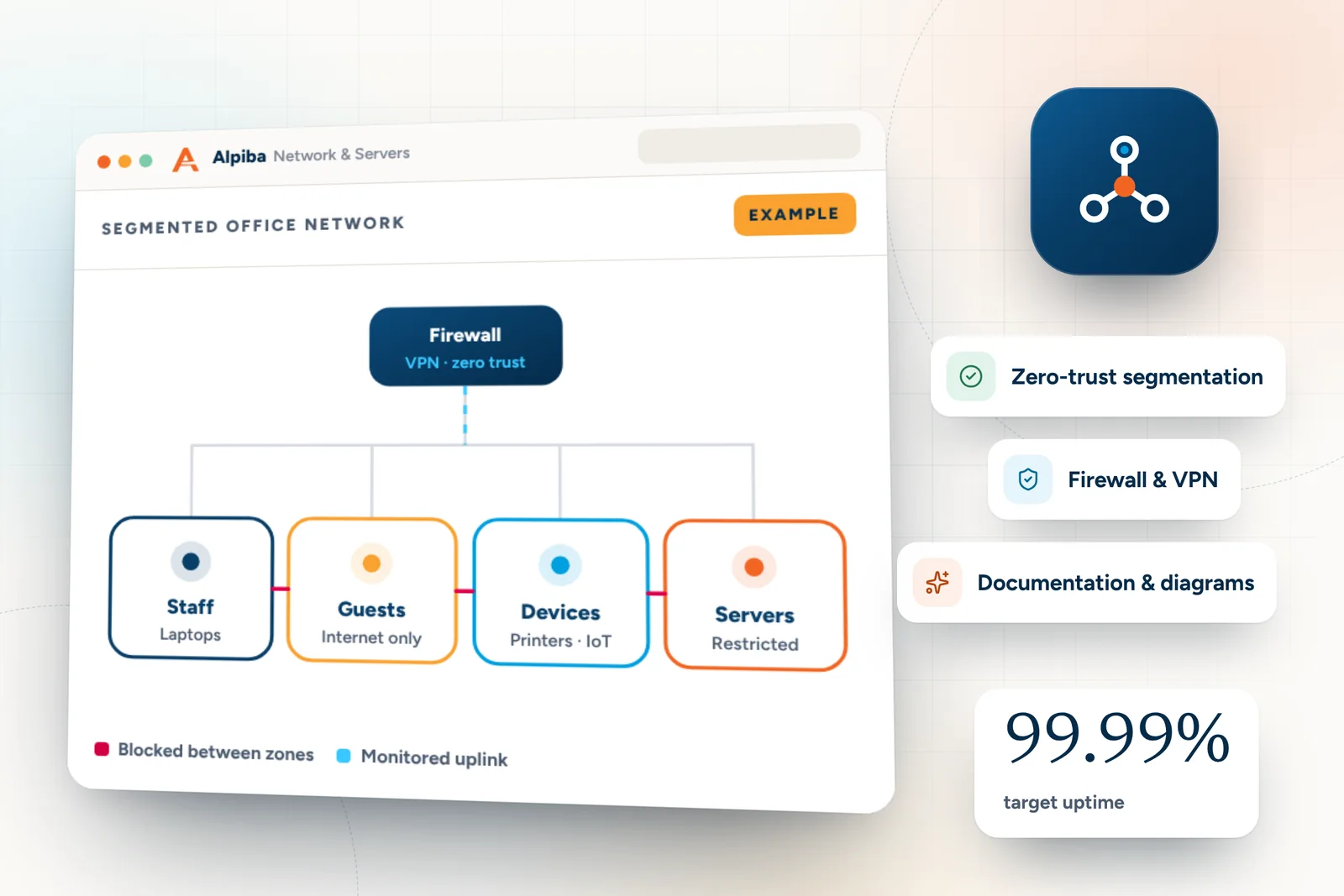
Example segmented office network from Alpiba Network & Servers, showing a firewall feeding separate zones for staff, guests, devices and servers
Example segmented office network for Network & Servers. Illustrative data, not from a real client.

Multi-site and hybrid teams

Plenty of businesses here run more than one location: a main office in Kearny Mesa with a warehouse in Otay Mesa, or practices in La Mesa and Chula Vista. Add staff who work from home in Oceanside or Santee a few days a week, and the old model of one office network behind one firewall stops making sense.

  • One standard for every site. Each location gets the same network design, security settings and documentation, so a problem in one place is solved the same way everywhere.
  • Secure links between locations. Firewalls, VPNs and zero-trust segmentation connect offices, labs and warehouses without letting one compromised device reach everything. This is core to our network and server consulting.
  • Identity instead of location. MFA and conditional access decide who gets in based on the person, the device and the context, whether they're at a desk in Carlsbad or a kitchen table in Escondido.
  • Ready on day one. Onboarding workflows give new hires at any site a configured, protected laptop and the right accounts, and offboarding removes access promptly when people leave.
Opening a new site?

Bring us in early. Network design, cabling plans and device orders are far easier to get right before move-in day than after it.

Employees outside San Diego

Remote support and 24/7 monitoring work wherever your people are, so a hire in another state gets the same helpdesk and protection as someone in Mission Valley. We're based in San Diego, so support outside the county is delivered remotely, with devices procured and configured through our onboarding workflow.

Local risks and how we plan for them

Every region has its hazards. Ours are well known, and most of their impact on IT can be planned for long before the day they arrive.

Regional risks and the IT plan for each
Risk or considerationWhat it can do to ITHow we plan for it
Wildfire and Santa Ana windsEvacuations, smoke closures and staff suddenly working from homeCloud-first access, MFA, laptops that work anywhere and a tested remote-work plan
SDG&E Public Safety Power Shutoffs (PSPS)Planned outages that can leave an office without power for an extended periodBattery backup for network gear, safe-shutdown settings, cloud services and an agreed communication plan
Earthquakes, with the Rose Canyon Fault running through the areaDamaged equipment, closed buildings and lost on-site serversImmutable off-site backups, documented recovery targets and quarterly restore drills
Coastal hospitality and retailGuest Wi-Fi and card payments sharing premises with business systemsGuest networks segmented from business systems, plus PCI DSS merchant readiness support
Cross-border operationsStaff, partners and freight moving through ports of entry, with devices that travelEncrypted devices, MFA, zero-trust access and clear rules on what data travels

Before Santa Ana season

Power shutoffs and evacuations can come with short notice, so the preparation has to happen in calmer months. A short pre-season review covers most of it.

  • Make sure SDG&E outage and PSPS notifications reach someone who will act on them
  • Test that servers and network gear on battery backup shut down cleanly
  • Confirm every critical app and file works from home, protected by MFA
  • Update staff contact lists and agree who announces an office closure
  • Check that laptops are patched and ready to leave the building
  • Review which systems have the shortest recovery targets and confirm their backups

When there's no warning

Earthquakes give no notice, and fires can move faster than any evacuation plan. That's where a written continuity plan earns its keep. Our backups and business continuity service starts with a business impact analysis, which ranks your systems by how long you can operate without them, then sets recovery targets and rehearses them every quarter.

Our typical recovery time objective (RTO), meaning the time it takes to get a system back, is under 4 hours.

Cross-border teams

Businesses in Otay Mesa and across the South Bay often have staff, partners or freight crossing the border every day. Keep sensitive files in Microsoft 365 or Google Workspace rather than stored on laptops, encrypt every device, require MFA on every account and give partners zero-trust access to only the apps they need.

Example helpdesk board from Alpiba Managed IT, showing new hire laptop + accounts ready (resolved), front-desk printer offline (resolved) and vpn access for new contractor (in progress)
Example helpdesk board for Managed IT. Illustrative data, not from a real client.

What a typical on-site visit covers

On-site time is planned, not improvised. Before a visit we review the site's ticket history and documentation, and afterward we update both so the next person starts from an accurate picture.

  • A network closet check: switches, firewall, cabling and labeling
  • Wi-Fi coverage and performance in the rooms your team actually uses
  • Battery backup (UPS) health and safe-shutdown settings for network gear
  • New-hire or replacement device setup, with security tools verified
  • Firewall, VPN or segmentation changes that are safer done in person
  • A walk-through with staff to catch small problems nobody reported
  • Updated network diagrams and site documentation
  • A short summary of what we did and anything that needs your decision

Bigger on-site work, such as an office move, a new lab or a warehouse network refresh, is planned as a project with a clear scope and scheduled in tight windows to keep disruption to a minimum.

How to get started

  1. Tell us where you are

    Call 858-399-4225 or book online, and share your locations, headcount and where people work.

  2. Free 30-minute assessment

    We map your risks, quick wins and on-site needs, with no obligation and no sales pressure.

  3. A plan that fits

    You get a flat per-user monthly plan that reflects your sites and support needs, with no surprise line items.

  4. Onboarding

    Discovery, documentation and quick wins come first, then monitoring, security and backups roll out in tight windows.

To get the most from the assessment, have these details handy:

  • Your locations, and which ones need on-site support
  • Headcount, including remote staff and where they work
  • Who handles IT today, whether in-house staff or a provider
  • Whether you run Microsoft 365, Google Workspace or both
  • Any upcoming audits, insurance renewals or customer security reviews

Inquiries are answered within 12 to 24 hours. If you're dealing with an active incident, call and you'll reach a senior engineer, not a call queue. You can also book your free assessment or send us a message.

FAQ

Service area questions, answered.

Straight answers to the questions we hear most. Still curious? Talk to a senior engineer.

Do you provide on-site IT support across San Diego County?

Yes. We're based in San Diego and provide on-site support throughout the county, from Downtown and Kearny Mesa to North County, East County and the South Bay. On-site visits cover networks, new offices, device rollouts and anything that needs a person in the room, while everyday requests are handled remotely. Managed clients also get 24/7 monitoring and support.

Which areas of San Diego County does Alpiba serve?

We serve businesses throughout San Diego County. That includes Central San Diego, such as Downtown, Mission Valley and Kearny Mesa; North City, including UTC, La Jolla and Sorrento Valley; coastal and inland North County, from Carlsbad and Encinitas to Escondido and Poway; East County, including La Mesa, El Cajon and Santee; and the South Bay, from Chula Vista to Otay Mesa.

Do you support businesses in North County?

Yes. We support coastal North County communities such as Del Mar, Solana Beach, Encinitas, Carlsbad and Oceanside, and inland communities including Escondido, San Marcos, Vista and Poway. Work that needs someone on site happens on-site, everyday requests are handled remotely, and managed clients get 24/7 monitoring wherever their people work, including home offices across North County.

Do you work with businesses in East County and the South Bay?

Yes. We support East County communities such as La Mesa, El Cajon, Santee, Lakeside and Alpine, and South Bay communities including Chula Vista, National City, Otay Mesa and Imperial Beach. That covers practices, offices, light industrial sites and logistics operations, with on-site and remote support and the same flat per-user monthly pricing as everywhere else we work.

Can you support employees who work outside San Diego?

Yes. Remote support and 24/7 monitoring work wherever your people are, so employees in other cities or states get the same helpdesk, security tools and protection as your local staff. Because we're based in San Diego, support outside the county is delivered remotely, with devices procured and configured through our onboarding workflow before they reach the new hire.

How do you decide whether an issue needs an on-site visit?

We start remotely whenever that's faster for you, which is often the case for account, software and security issues. A visit makes sense when the work needs someone physically there: cabling, network closets, Wi-Fi problems tied to a physical space, new offices, moves or device rollouts. Either way, the request runs through the same helpdesk and the same documentation.

What are Alpiba's support hours?

Our office line is open Monday to Friday, 7am to 7pm Pacific. Outside those hours, managed clients still have 24/7 monitoring and support, and our SOC, staffed by people around the clock, averages under 15 minutes to first response. If you have an active incident, call 858-399-4225 and you'll reach a senior engineer, not a call queue.

Do you support hybrid staff who work from home around the county?

Yes. A home office in Oceanside or Chula Vista gets the same protection as your main office: MFA and conditional access on every account, managed EDR on every laptop and 24/7 monitoring for managed clients. Home-office problems are handled remotely through the same helpdesk, so nobody waits for a visit, and hands-on fixes can be scheduled at your office when needed.

How can my business prepare for SDG&E power shutoffs?

Plan before fire season. Put battery backup on network equipment with safe-shutdown settings, keep critical files and apps in the cloud where it makes sense, make sure staff can work securely from home with MFA, and agree how you'll communicate during an outage. SDG&E can call Public Safety Power Shutoffs when wildfire risk is high, especially in fire-prone areas.

Do you help businesses plan IT for earthquakes and wildfires?

Yes, through our backups and business continuity service. We run a business impact analysis to rank your systems, keep immutable backups off-site so a damaged office doesn't take your data with it, document recovery targets and rehearse restores every quarter. Our typical recovery time objective is under 4 hours, and continuity playbooks spell out who does what.

Do you support businesses with cross-border operations?

Yes, for businesses in the county that trade or work across the border, such as logistics and manufacturing operations in Otay Mesa. Common priorities are encrypted devices and MFA for staff who cross regularly, zero-trust access for partners, and segmented networks between warehouses and offices. Tell us about any staff or sites in Mexico during your assessment so we can scope support honestly.

How do I find out if my location is covered?

Ask us. Call 858-399-4225, email info@alpiba.com or book a free 30-minute assessment, and tell us where your offices, sites and remote staff are. We'll confirm how on-site and remote support will work for each location before you commit to anything. We reply to every inquiry within 12 to 24 hours.

Free 30-minute assessment

Let's make IT the easy part.

Tell us a little about your business. A senior engineer will map your top risks, quick wins and a right-sized plan, with no obligation and no sales pressure.

  • A senior engineer, not a salesperson
  • Reply within 12–24 hours
  • Flat per-user pricing if you want our help
Roopa, founder of Alpiba

Founder-led and San Diego basedRoopa founded Alpiba to give growing businesses a real technology partner.

858-399-4225Mon–Fri, 7am–7pm PT · 24/7 for managed clients
info@alpiba.comReply within 12–24 hours

Fields marked * are required. By submitting, you agree that Alpiba may contact you about your request. We reply within 12–24 hours; for an active incident, call 858-399-4225.

Call Free assessment