SOC online 24/7Breach or outage? Call 858-399-4225

Free guidesinfo@alpiba.comMon–Fri, 7am–7pm PT

Alpiba

Managed IT

Co-managed IT services in San Diego that keep your IT team in charge.

Keep the IT people you trust and add the depth they're missing. Your team keeps ownership of day-to-day priorities while Alpiba adds cybersecurity, cloud expertise and coverage nights, weekends and vacations.

<15 min average first response Flat per-user pricing Free guide: The Co-Managed IT Playbook

Two colleagues talking through work at a laptop

Quick answer

What is co-managed IT?

Co-managed IT is a partnership where an outside provider works alongside your internal IT staff, sharing responsibilities instead of replacing them. With Alpiba, your team keeps ownership of daily priorities while we add 24/7 security monitoring, Microsoft 365 and Google Workspace specialists, network and server projects, and after-hours coverage.

What's included

Everything in Co-Managed IT.

One accountable team delivers every piece below, documented and reviewed with you every quarter.

  • After-hours & vacation coverage

    Nights, weekends and time off are covered, so your IT lead can actually log off.

  • 24/7 SOC monitoring

    Human analysts watch your endpoints, identities, email and cloud around the clock.

  • Microsoft 365 & Google expertise

    Certified engineers for migrations, hardening and the tricky admin work.

  • Network & server projects

    Extra hands and specialist skills for refreshes, new offices and upgrades.

  • Shared documentation

    One set of runbooks and diagrams both teams work from.

  • Escalation path

    A senior engineer to call when an issue goes beyond your team's day job.

Why it matters

Your team. Our depth.

One IT generalist can't be an expert in security, cloud, networking and helpdesk at once, or be awake 24/7. Co-managed IT gives them a bench of specialists without the cost of hiring one.

  • Your team keeps ownership
  • Written responsibility split
  • Least-privilege, documented access
  • Quarterly reviews together
Responsibility splitExample
AreaYour teamAlpiba
Day-to-day helpdesk Owns —
24/7 security monitoring — Owns
Microsoft 365 / Google admin Shared Shared
Network & server projects Shared Shared
After-hours coverage — Owns
Roadmap & budget Shared Shared

Outcomes

What you can expect.

No more burnout

Your IT lead stops being on call every night and weekend.

Enterprise depth

Security, cloud and network specialists on demand.

Coverage without hiring

Add capability without adding headcount.

The complete guide

Co-managed IT services in San Diego, explained.

11 min readBy the Alpiba teamUpdated October 15, 2026

On this page

Your IT lead knows your people, your systems and the history behind every odd configuration. What they can't do is watch security alerts at 3am, cover their own vacation and run a network refresh while the ticket queue keeps growing. Co-managed IT services in San Diego exist for exactly that gap. Alpiba works alongside your internal team under a written split of who does what, adding a 24/7 SOC, Microsoft 365 and Google Workspace specialists, project hands and after-hours coverage.

Done well, co-managed IT makes your team stronger, not smaller. They keep ownership of priorities and decisions; we take the work that needs round-the-clock staffing or specialist depth, and we document it in the same place they do.

This page covers how the split works, what access we need and why, how escalation runs at any hour, and when fully managed IT is the better choice. It is written for IT leads and for the executives who want to keep them.

What co-managed IT means for a San Diego business

Co-managed IT is a partnership, not a takeover. Your internal IT staff stay in place and keep the relationships, context and priorities they own today. An outside provider shares the work under a written agreement, taking the pieces that are hard for a small team to staff or to stay expert in.

It is also different from staff augmentation, where you rent a person to sit in your queue. With co-managed IT you get a team, its tooling and its processes, plus round-the-clock coverage that no single hire can provide. Arrangements are usually built around four needs.

  • Coverage. Nights, weekends, holidays and vacations, so one person is not the company's only pager.
  • Depth. Specialists in security, Microsoft 365, Google Workspace, networks and servers, on call when a problem goes beyond the day job.
  • Capacity. Helpdesk overflow during busy weeks and extra hands for projects that keep slipping behind daily tickets.
  • Security monitoring. A human-staffed security operations center watching alerts around the clock, which a small internal team can't staff on its own.

In San Diego this often looks like real internal IT with a thin bench: a biotech in Sorrento Valley whose IT manager also supports lab instrument PCs, a manufacturer in Escondido whose IT lead also runs the ERP, or a software company in UTC where one engineer handles laptops, identity and the office network.

How responsibilities are split: a RACI starting point

The foundation of co-managed IT is a written responsibility matrix, often called a RACI. For each area it says who is Responsible for doing the work, who is Accountable for the outcome, who is Consulted before changes and who is Informed afterward. We agree it during onboarding and revisit it at every quarterly review.

Example starting split (R = does the work, A = owns the outcome, C = consulted, I = informed)
AreaYour IT teamAlpibaNotes
Day-to-day helpdeskA, RR for overflow and after hoursOverflow rules agreed in writing
24/7 security monitoringIA, RHuman SOC, average first response under 15 minutes
Containing an active incidentA for business decisionsR for the containment playbookPre-approved actions, such as isolating a laptop
Patching laptops and serversARYour team sets windows and exceptions
Microsoft 365 or Google Workspace adminA, R for daily changesR for hardening and complex changesAll changes logged in one ticket system
Network and server projectsAR, or shared per projectScoped and approved per project
Backups and restore testsARRestore drill results reported quarterly
Onboarding and offboardingA, RR when your team is outOne checklist for both teams
Vendors, budget and roadmapA, RCReviewed together each quarter
Write down the gray areas

Friction usually comes from tasks nobody listed: the conference room display, the warehouse scanners, the CEO's home network. List them, give each one an owner and revisit the list every quarter.

There is no single correct split. A team with a strong systems engineer may keep all server work and hand us only security and after-hours coverage. A team of one may hand us patching, monitoring and most projects. What matters is that it is written down, so nobody discovers a gap during an outage.
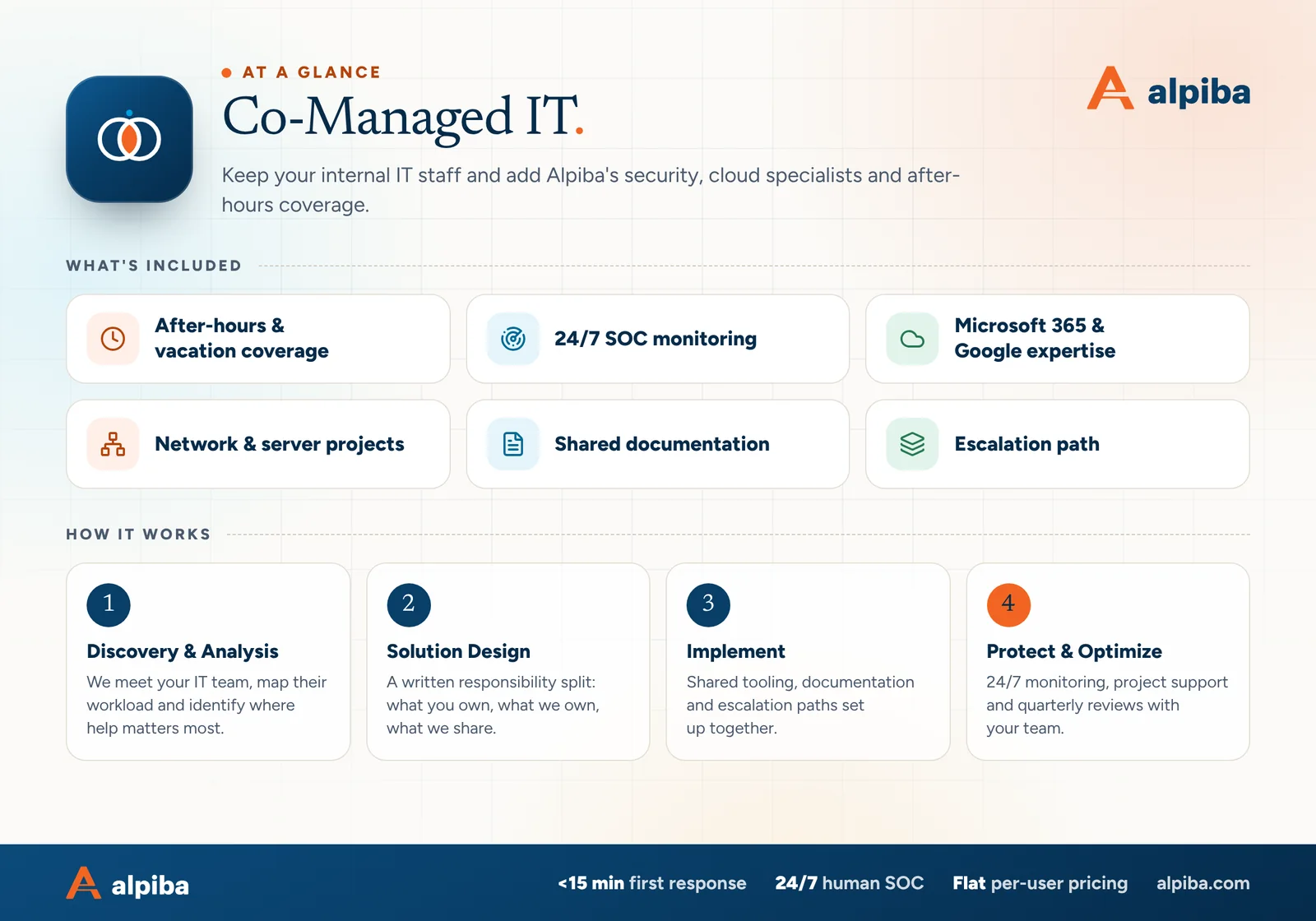
Co-Managed IT at a glance. Included: After-hours & vacation coverage, 24/7 SOC monitoring, Microsoft 365 & Google expertise, Network & server projects, Shared documentation and Escalation path. How it works: Discovery & Analysis, Solution Design, Implement and Protect & Optimize.
Co-Managed IT at a glance: what is included and how we roll it out.

Tooling and access: shared, documented, least privilege

Unclear access is the fastest way to sour a co-managed relationship. Your team should always know who can touch what, and every change should be traceable to a named person. These are the rules we work to.

  • Named admin accounts. Every Alpiba engineer uses an individual, MFA-protected account. There are no shared logins, so every change has a name next to it.
  • Least privilege. We hold the rights the agreed split needs and nothing more, following the principle of least privilege. Higher privileges can be granted for a project and removed afterward.
  • One system of record. Both teams work from the same ticket queue and history, agreed during onboarding, so nothing is solved twice or lost between two tools.
  • Shared visibility. Monitoring and security agents are deployed with your team's knowledge, and we agree how your team sees the device health and alert information we act on.
  • Shared documentation. One set of runbooks, diagrams and vendor records that both teams maintain, rather than two partial copies.
  • Break-glass accounts. Emergency admin accounts are sealed, monitored and used only when normal access fails, with both teams alerted whenever one is touched.
  • Change control. Planned changes go through an agreed window with notice to your team. Emergency changes are explained in writing the same day.

Identity is where these rules are enforced in practice, through MFA, conditional access and role-based admin rights. Our zero-trust identity security service explains how that works across Microsoft 365 and Google Workspace.

Escalation paths that work at any hour

Escalation fails when it depends on someone remembering whom to call. Agree severity levels, a call tree and pre-approved actions in advance, then test them before you need them.

Example severity levels for a co-managed team
LevelExampleWho acts firstWho is told
CriticalRansomware alert, email account takeover, whole office offlineAlpiba SOC or on-call engineer, any hourYour IT lead immediately, then leadership per the call tree
HighA key system down for one team, a failed backup on a critical serverWhichever team is on shiftBoth teams the same day
NormalOne user's laptop, a permissions changeYour team in hours, Alpiba after hoursRecorded in the ticket history
PlannedProjects and scheduled changesPer the project planChange notice before work starts

What happens when the SOC sees something at 2am

  1. Triage

    A human analyst reviews the alert and confirms whether it is real. Our average first response is under 15 minutes.

  2. Contain

    For ransomware or breach events, the documented containment playbook starts within the first hour, using actions your team has pre-approved, such as isolating a device or disabling an account.

  3. Call

    The on-call contact on your call tree gets a plain-English summary: what happened, what has been done and what needs a decision.

  4. Hand back

    In the morning your team receives a written incident summary, the open questions and any follow-up tickets.

Pre-approve containment actions

Decide in advance which actions the SOC can take without waking anyone, such as isolating a laptop or blocking a sign-in. During a ransomware attack, minutes matter, and nobody wants that debate at 2am.

Covering after-hours, weekends and vacations

In a one- or two-person IT department, the IT lead's phone is the company's pager. That works until they get sick, take a real vacation or simply burn out. Co-managed coverage means nights, weekends and time off are handled by engineers who already know your environment, because they work in it all year.

  • Handled right away. Security alerts, outages, failed backups on critical systems and lockouts that stop urgent work, at any hour.
  • Logged for the morning. New software requests, routine changes and anything else that can safely wait, with notes so your team starts the day informed.

Coverage is only as good as the handover. Before your IT lead's next week away, make sure these exist:

  • A runbook for the ten most common requests, with screenshots where they help
  • Admin credentials in a shared, access-controlled vault, not on a sticky note or in one browser
  • Vendor contacts, account numbers and support contracts in one place
  • A list of known issues and anything fragile that shouldn't be touched
  • Planned changes paused, or scheduled with both teams aware
  • Clear rules on what can wait until they return and what can't
  • An out-of-office message that tells staff exactly how to get help

The same discipline reduces key-person risk. If your IT lead ever leaves, the documentation and shared history mean the business keeps running while you hire, instead of starting from zero.

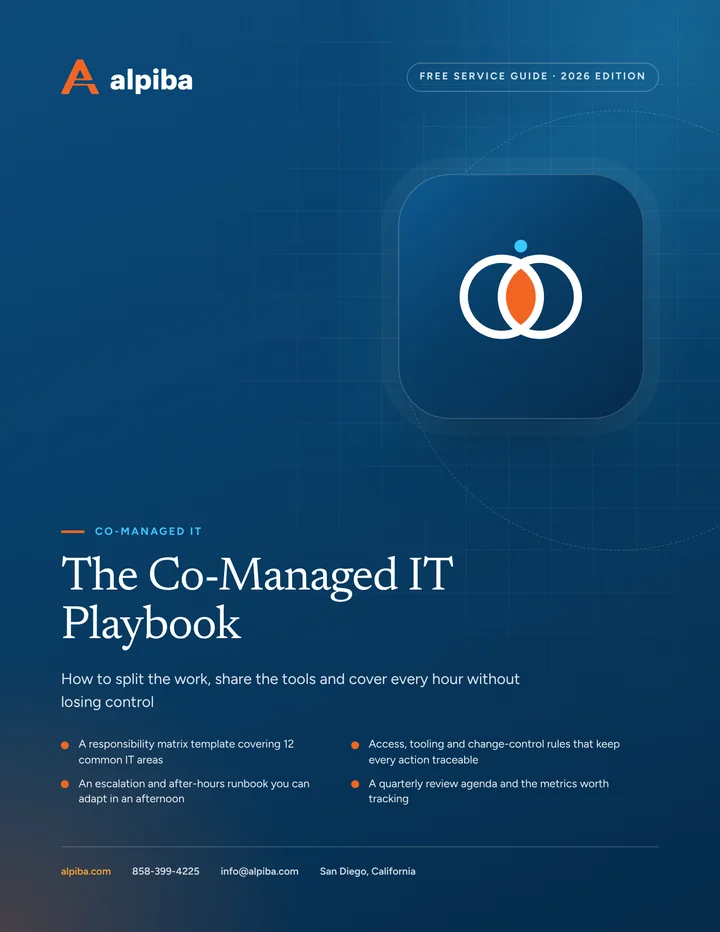
Cover and two sample pages of The Co-Managed IT Playbook, a free 12-page PDF guide from Alpiba with a 22-point checklist
Inside The Co-Managed IT Playbook.

Security monitoring your internal team can't staff

Watching security alerts around the clock takes several trained people working in shifts, plus tooling that correlates signals across devices, accounts and email. A small internal team can't staff that without burning out, and attacks often start outside business hours, when nobody is looking.

Many internal teams already have good tools. Microsoft 365, Google Workspace and modern endpoint software all raise security alerts. The gap is rarely the tooling; it is having a trained person read every alert, at any hour, and act on the ones that matter.

Our human-staffed SOC fills that gap through 24/7 managed detection and response. Analysts watch your endpoints, identities, email and cloud around the clock, with an average first response under 15 minutes.

  • Endpoints. Managed EDR/XDR on laptops and servers spots ransomware-like behavior and can isolate a device before it spreads.
  • Identities. Suspicious sign-ins, repeated MFA prompts, new mail forwarding rules and unusual admin activity are investigated, not just logged.
  • Email. Phishing that slips past filters, and messages your staff report, are reviewed and acted on.
  • Cloud. Risky changes in Microsoft 365 or Google Workspace, such as new admin roles or mass external sharing, raise alerts.

Your team stays in the loop. We agree which alerts they want to see, consult them when tuning rules around unusual systems such as lab instruments or production software, and share a written summary of every incident.

Keeping your team in control, and helping it grow

A common worry is that a provider will slowly make the internal team look unnecessary. We work the other way. Your team sets priorities, approves changes and owns the roadmap with leadership; our job is to make them more effective, not easier to replace.

What your team brings

Knowledge of your people, history and unwritten rules, plus the systems unique to your business. That context is hard to replace, and it is the reason co-managed works.

What Alpiba brings

A bench of specialists across security, Microsoft 365, Google Workspace and networks, plus round-the-clock staffing. Your team gets someone to call, not someone to compete with.

What you share

Documentation, ticket history, quarterly reviews and the roadmap. Both teams work from the same facts and the same plan.

  • Shadowing on projects, so new skills stay in-house after the project ends
  • Runbooks written together, so knowledge transfer happens as part of normal work
  • Direct access to a senior engineer for second opinions
  • Time freed from tickets for planning, vendor work and the projects leadership actually asked for
  • A seat at quarterly reviews, presenting results alongside us

If leadership wants a longer-range plan, our IT strategy and vCIO service builds the roadmap and budget with your IT lead, not around them.

When co-managed beats fully managed, and when it doesn't

Both models work. The right one depends on what your internal team does well today and what you want them doing a year from now.

Co-managed is usually the better fit when

  • You employ IT staff you value and want to keep
  • You run on-site systems that need daily local knowledge, such as lab instruments, production lines or warehouse scanners
  • You plan to grow an internal IT function over time
  • Customers, auditors or investors expect named internal ownership of IT
  • You need extra hands for a wave of projects, such as a network and server refresh or a cloud migration

Fully managed is usually the better fit when

  • Your “IT person” is really an office manager or a developer doing it on the side
  • Your IT lead has left and you don't plan to rehire
  • You would rather have one provider own outcomes end to end

If the second list sounds like you, fully managed IT with white-glove support may be simpler. The split can also change over time: teams move work between columns as people join or leave, and the written matrix makes that a quarterly decision rather than a crisis.

Comparing the cost

Co-managed IT is priced like the rest of our work: a flat monthly fee per user, no surprise line items, and a scope agreed after a free 30-minute assessment. The scope follows the matrix, so a plan built around security monitoring and after-hours coverage is sized differently from one that also includes patching, cloud administration and helpdesk overflow. Projects are scoped and approved separately.

Compare that with the real alternative: hiring another IT person, adding their tools and training, and still having nobody watching at 3am or during their vacation. The question is not whether your team is worth keeping. It is which parts of the job one or two people shouldn't be carrying alone.

Co-managed IT services in San Diego: where the model fits

San Diego's mix of industries creates a few recognizable co-managed patterns.

  • Life sciences. Biotech teams around Torrey Pines and Sorrento Valley may have an internal IT person focused on lab systems and instruments. Co-managed IT adds identity, cloud and security depth as audits and headcount grow; our biotech IT services page covers that world in more detail.
  • Manufacturing and cross-border logistics. Plants and warehouses in Otay Mesa, Escondido and Poway often run shifts that outlast the IT team's day. After-hours coverage and 24/7 monitoring match operating hours, not office hours.
  • Hospitality and multi-site operators. Hotels, restaurants and attractions run seven days a week. A small internal team plus after-hours coverage keeps weekend problems from waiting until Monday.
  • Fire season. When SDG&E calls Public Safety Power Shutoffs or evacuations reach East County or North County, your IT lead may be looking after their own family. A second team that knows your systems keeps support running.

Because we are local, co-managed IT services in San Diego can include on-site help across the county for projects, hardware and anything your team wants a second pair of hands for, with remote support wherever your people work.

Illustration of the San Diego skyline at sunset, with downtown towers, the bridge across the bay, sailboats and palm trees
San Diego, where Alpiba is based.

Talk to an engineer

Free 30-minute assessment. We reply within 12–24 hours.

Fields marked * are required. By submitting, you agree that Alpiba may contact you about your request. We reply within 12–24 hours; for an active incident, call 858-399-4225.

How it works

From first call to fully protected.

  1. Discovery & Analysis

    We meet your IT team, map their workload and identify where help matters most.

  2. Solution Design

    A written responsibility split: what you own, what we own, what we share.

  3. Implement

    Shared tooling, documentation and escalation paths set up together.

  4. Protect & Optimize

    24/7 monitoring, project support and quarterly reviews with your team.

Signs you need it

Sound familiar?

If two or more of these ring true, a 30-minute assessment will show you where to start.

Book a free assessment
  • Your IT person is on call 24/7
  • Security alerts go unreviewed after hours
  • Projects stall behind daily tickets
  • You need specialists for cloud or network work
  • Vacations leave you uncovered

From our founder

“SMBs deserve a strategic technology partner, without enterprise complexity or cost.”

Roopa · Founder, Alpiba · former Accenture advisor

Alpiba is founder-led. Every Co-Managed IT engagement starts by listening to how your business runs, and senior engineers stay with you from the first call onward.

Roopa, founder of Alpiba, standing in front of evening city lights
Cover of The Co-Managed IT Playbook, a free PDF guide

Free guide · PDF

The Co-Managed IT Playbook

A practical playbook for IT leads and executives setting up a co-managed partnership: a responsibility matrix, access rules, an escalation runbook and the metrics that show whether it is working.

  • A responsibility matrix template covering 12 common IT areas
  • Access, tooling and change-control rules that keep every action traceable
  • An escalation and after-hours runbook you can adapt in an afternoon
  • A quarterly review agenda and the metrics worth tracking
Preview what's inside

Get the free guide

Instant download. By submitting, you agree that Alpiba may contact you about this guide; you can ask us to delete your details at any time.

FAQ

Co-Managed IT questions, answered.

Straight answers to the questions we hear most. Still curious? Talk to a senior engineer.

Do you replace our in-house IT team?

No. Co-managed IT is designed to keep your internal team in place and in charge of daily priorities. We add what is hard for a small team to provide alone: 24/7 security monitoring, specialists in Microsoft 365, Google Workspace and networks, project capacity and after-hours coverage. If you ever want a fully outsourced IT department instead, we offer that too.

How do co-managed IT responsibilities get split?

With a written responsibility matrix agreed during onboarding. For each area, such as helpdesk, patching, security monitoring, cloud administration, projects and vendors, it states who does the work, who owns the outcome, who is consulted and who is informed. We revisit it at every quarterly review, so the split changes deliberately as your team changes.

Can co-managed IT include 24/7 security monitoring?

Yes, and it is often the piece internal teams find hardest to staff themselves. Our human-staffed SOC monitors devices, accounts, email and cloud services 24/7, and its average first response is under 15 minutes. If ransomware or a breach is suspected, our documented containment playbook is triggered within the first hour, within limits your team has approved in advance.

Will our IT staff keep admin control?

Yes. Your team keeps ownership of its environment and decides what we can change. Alpiba works through named, MFA-protected accounts with documented, least-privilege access agreed with you, so every change is traceable to a person. Emergency access is sealed and monitored, and planned work is scheduled in agreed change windows that your team knows about in advance.

How much do co-managed IT services in San Diego cost?

It depends on how much of the work we take on: the number of users and devices covered, whether 24/7 security monitoring is included, the after-hours scope and how much project work you expect. Pricing is flat, per user and monthly, with no surprise line items, and we scope it after a free, no-obligation 30-minute assessment.

What is the difference between co-managed IT and staff augmentation?

Staff augmentation rents you a person to work inside your queue; co-managed IT gives you a team. You get specialists across security, cloud and networks, round-the-clock coverage, shared tooling and documentation, and a written split of responsibilities. Your team keeps direction, and you are not dependent on one contractor's availability or knowledge.

Can you cover our IT person's vacation or leave?

Yes. After-hours and vacation coverage are core parts of co-managed IT. Because our engineers already work in your environment and share the same documentation and ticket history, they can pick up support while your IT lead is away, whether for a week of vacation or a longer leave. A short handover checklist before each absence keeps it smooth.

How does after-hours escalation work in a co-managed setup?

It follows a call tree and severity levels agreed in advance. A SOC analyst triages each alert. Critical events such as ransomware trigger the containment playbook within the first hour using pre-approved actions, and your on-call contact gets a plain-English call. Lower-priority issues are logged and handed to your team in the morning with notes.

Do both teams use the same ticketing system?

They should, and we agree which one during onboarding. One system of record means both teams see the same queue, priorities and history, nothing is solved twice and nothing is lost between tools. Whichever system you choose, every request, change and incident is logged, so your team has a complete picture of the work being done.

What happens if our IT person leaves?

Co-managed IT reduces that risk, because knowledge is shared and documented rather than held by one person. If your IT lead leaves, we can carry more of the day-to-day work while you hire a replacement, or you can move to a fully managed model if you decide not to rehire. The responsibility matrix makes either change straightforward.

Can co-managed IT cover projects like migrations or network refreshes?

Yes. Network and server projects, Microsoft 365 and Google Workspace migrations, new office set-ups and security upgrades are a natural fit, because they need extra hands and specialist skills for a limited period. Each project is scoped and approved separately, and your team decides how much to do themselves and how much to hand to us.

Is co-managed IT a good fit for a one-person IT department?

Often, yes. A single IT person can't be on call every hour, stay expert in security, cloud and networking, and still clear the helpdesk queue. Co-managed IT gives them backup after hours, specialist depth and help with projects, while they keep the relationships and context that make them valuable to the business.

Related services

Works best together.

All services
People working at laptops across a large open office

Managed IT

Managed IT & White-Glove Support

Your single point of contact for all technology, with a tailored helpdesk and on-site support backed by clear SLAs.
Two business partners reviewing plans together at a laptop

Managed IT

IT Strategy & vCIO

Enterprise-grade technology leadership without a full-time CIO: roadmap, budget and risk, reviewed quarterly.

Free 30-minute assessment

Ready for Co-Managed IT? Let's talk.

Tell us about your business and what prompted the search. A senior engineer will reply within 12–24 hours to set up your free 30-minute assessment.

  • A senior engineer, not a salesperson
  • Reply within 12–24 hours
  • Flat per-user pricing if you want our help
Roopa, founder of Alpiba

Founder-led and San Diego basedRoopa founded Alpiba to give growing businesses a real technology partner.

858-399-4225Mon–Fri, 7am–7pm PT · 24/7 for managed clients
info@alpiba.comReply within 12–24 hours

Fields marked * are required. By submitting, you agree that Alpiba may contact you about your request. We reply within 12–24 hours; for an active incident, call 858-399-4225.

Call Free assessment