SOC online 24/7Breach or outage? Call 858-399-4225

Free guidesinfo@alpiba.comMon–Fri, 7am–7pm PT

Alpiba

Biotech & Life Sciences

Biotech IT services in San Diego that protect the science and keep the lab running.

San Diego is one of the country's major biotech hubs, and research teams here move fast. Alpiba protects research IP, isolates lab instruments, secures collaboration with partners and keeps IT ready for the next hire, the next lab and the next funding round.

  • IP protection
  • Lab uptime

Quick answer

What IT support does a biotech company need?

A biotech company needs IT that protects research IP and confidential data, keeps lab instruments and research systems online and isolated from threats, supports secure collaboration with partners, and scales quickly as headcount and lab space grow. Alpiba delivers this with zero-trust access, segmented networks, 24/7 SOC monitoring and managed IT.

The challenge

What makes IT different for biotech teams.

  1. Research IP is the business

    Experimental data, compounds and know-how are what investors and partners value, and what attackers want.

  2. Lab instruments on older systems

    Instrument PCs often run software that can't be patched or upgraded without revalidation.

  3. Collaboration with outside partners

    Data moves between your team, partners and service providers, often through shared folders and email.

  4. Growth that outpaces IT

    New hires, new lab space and new tools arrive faster than an ad-hoc IT setup can keep up.

How Alpiba helps

Four ways we protect biotech teams.

Research IP protection

Zero-trust access, data loss prevention and 24/7 monitoring around the systems that hold your science.

Segmented lab networks

Instruments that can't be patched are isolated on their own network segments with tightly controlled access.

Secure partner collaboration

Governed sharing in Microsoft 365 or Google Workspace, with external access reviewed and logged.

Scale-ready IT

Onboarding workflows, standard devices and network design that keep up with headcount and new sites.

Illustrative scenario

What this looks like in practice.

A composite example built from situations we see in biotech teams. It shows how we would approach the work, not results from a named client.

Illustrative scenario

Making a growing Sorrento Valley lab partner-ready without slowing research

A 30–60 person preclinical biotech in Sorrento Valley with a wet lab of instrument PCs on older operating systems, Microsoft 365 for email and files, a cloud ELN and research data moving to cloud storage. A pharma partner has sent a security questionnaire ahead of a collaboration.

Services involved: Network & Servers, Zero Trust & Identity, Compliance Readiness, Backups & DR

The situation

  • Instrument PCs, freezer sensors and staff laptops share one flat network, and data moves between them on USB drives.
  • Several scientists share bench logins, and consultants from finished projects still have access to program folders.
  • The questionnaire asks for MFA coverage, backup testing and an incident response plan, and nobody can produce evidence for any of them.

What we would do

  1. Discovery in the labWe would inventory instruments, accounts, cloud apps and data flows with the lab manager, and agree a change process with the quality lead before touching anything near validated systems.
  2. Identity firstMFA and conditional access would go on every account, shared logins would become named accounts where the software allows, and stale guest and consultant access would be removed.
  3. Separate the labInstrument PCs and facility devices would move to their own segments, with a controlled, logged data path to storage and vendor remote access through approved, time-limited sessions.
  4. Evidence and recoveryImmutable off-site backups would protect research data, a quarterly restore drill would include an instrument PC rebuild, and controls would be mapped to NIST CSF with evidence ready for the partner.

What good looks like

  • Every account is protected by MFA, with a report that proves it.
  • Instrument PCs are isolated and still running as validated, with no USB data path.
  • Questionnaire answers are backed by current evidence rather than intentions.
  • A 24/7 SOC watches the environment with an average first response under 15 minutes, and restores are tested every quarter.
<15 minaverage first response
<1 hrransomware containment playbook
<4 hrstypical recovery time objective
24/7human-staffed SOC

This scenario is an illustrative composite, not a client case study. Figures shown are Alpiba service standards, not client results.

From our founder

“SMBs deserve a strategic technology partner, without enterprise complexity or cost.”

Roopa · Founder, Alpiba · former Accenture advisor

Alpiba brings enterprise-grade security and support to biotech teams that do not have an enterprise IT department, with senior engineers who learn how your work actually runs.

Roopa, founder of Alpiba, standing outdoors in a white polka-dot dress

The complete guide

Biotech IT services in San Diego, explained.

11 min readBy the Alpiba teamUpdated October 15, 2026

On this page

A biotech company asks its IT to do two things that pull in opposite directions. The lab needs instrument PCs to stay exactly as they were installed or validated, while the business needs a patched, monitored environment that a pharma partner's security team will sign off on. Good biotech IT services in San Diego hold both at once: the sequencer PC that cannot take an update keeps running safely on its own network, and email, identity and research data meet the standard partners and investors expect.

This page is for founders, operations leads, lab managers and first IT hires at life sciences companies on the Torrey Pines mesa, in Sorrento Valley and UTC, and across North County. It explains how lab IT differs from office IT, what partners and auditors ask, the risks that matter most, a maturity table to score yourself against, a 90-day plan and how to judge an IT partner.

Alpiba covers the IT side: networks, identity, devices, cloud, 24/7 monitoring, backups and the evidence behind your security answers. Validation, quality systems and regulatory strategy stay with your quality team and advisors, and we work alongside them.

Why lab IT is different from office IT

San Diego County's life sciences cluster is concentrated around Torrey Pines, Sorrento Valley and UTC, with more companies in Carlsbad and the rest of North County. Many start with a handful of people in shared incubator lab space, running on whatever tools the founders already had. A financing round or partnership then adds headcount, a dedicated lab and outside collaborators, often within a few quarters.

  • Instruments are computers you can't fully manage. Sequencers, mass spectrometers, plate readers and imaging systems ship with a control PC whose operating system and software are fixed by the vendor or by your own validation. Updating them can void vendor support or trigger revalidation.
  • Data is large and has to stay original. Imaging and sequencing runs produce very large files that must move from the instrument to shared storage and analysis without being altered, lost or stranded on one PC.
  • The science is the asset. Pre-patent results, assay methods, compound structures and know-how drive valuation, and they are exactly what a careless share link, a departing employee or an attacker would take.
  • Many outside hands. Contract research organizations (CROs), academic collaborators, consultants and instrument service engineers all need some access, usually on short notice and for a limited time.
  • Facilities share the network. Freezer and incubator alarms, environmental sensors, badge readers and building systems often sit on the same network as staff laptops, with default settings nobody has reviewed.

None of this fits a standard office IT playbook. Strong biotech IT services in San Diego start at the bench and work outward, so the lab keeps running while the rest of the company meets an enterprise standard.

What regulators, partners and investors expect from your IT

No single law dictates how a biotech runs its IT. Expectations arrive from three directions: rules for regulated research if your data will support a submission, security questionnaires from partners and investors, and general privacy and breach laws. Knowing which apply to you keeps the effort where it counts.

Data integrity in regulated research

If your records support FDA submissions or GxP work (the good laboratory, manufacturing and clinical practice regulations), FDA's rules for electronic records and signatures in 21 CFR Part 11 and its data integrity guidance come into play. Regulators describe trustworthy data with the ALCOA+ principles: attributable, legible, contemporaneous, original and accurate, plus complete, consistent, enduring and available.

Validating those systems is a quality and regulatory responsibility. IT's job is to supply the everyday controls that keep validated systems trustworthy:

  • Named user accounts on instruments and lab software, with no shared bench logins where the software supports individual users
  • Synchronized clocks across instrument PCs, servers and cloud systems, so audit-trail timestamps line up
  • Documented change records for operating system, network and software changes near validated systems
  • Backups and archives that preserve original files and their metadata, with restores that are actually tested
  • Access reviews that show who could create, change or delete records, and when that changed

Partner and investor questionnaires

Pharma partners, platform customers and investors' diligence teams often send a security questionnaire before they share data or sign. Expect questions on MFA, device management, encryption, logging, incident response, vendor management and backups. If you host partner data or sell a platform or data service, a SOC 2 Type II report may be requested; otherwise a documented control set mapped to NIST CSF or ISO 27001 usually answers the same questions.

California's CCPA, as amended by the CPRA, may also apply depending on your size and the personal information you hold, and clinical-stage teams may handle trial data with its own privacy obligations. We help with readiness and evidence; auditors issue reports, and your counsel interprets the law.
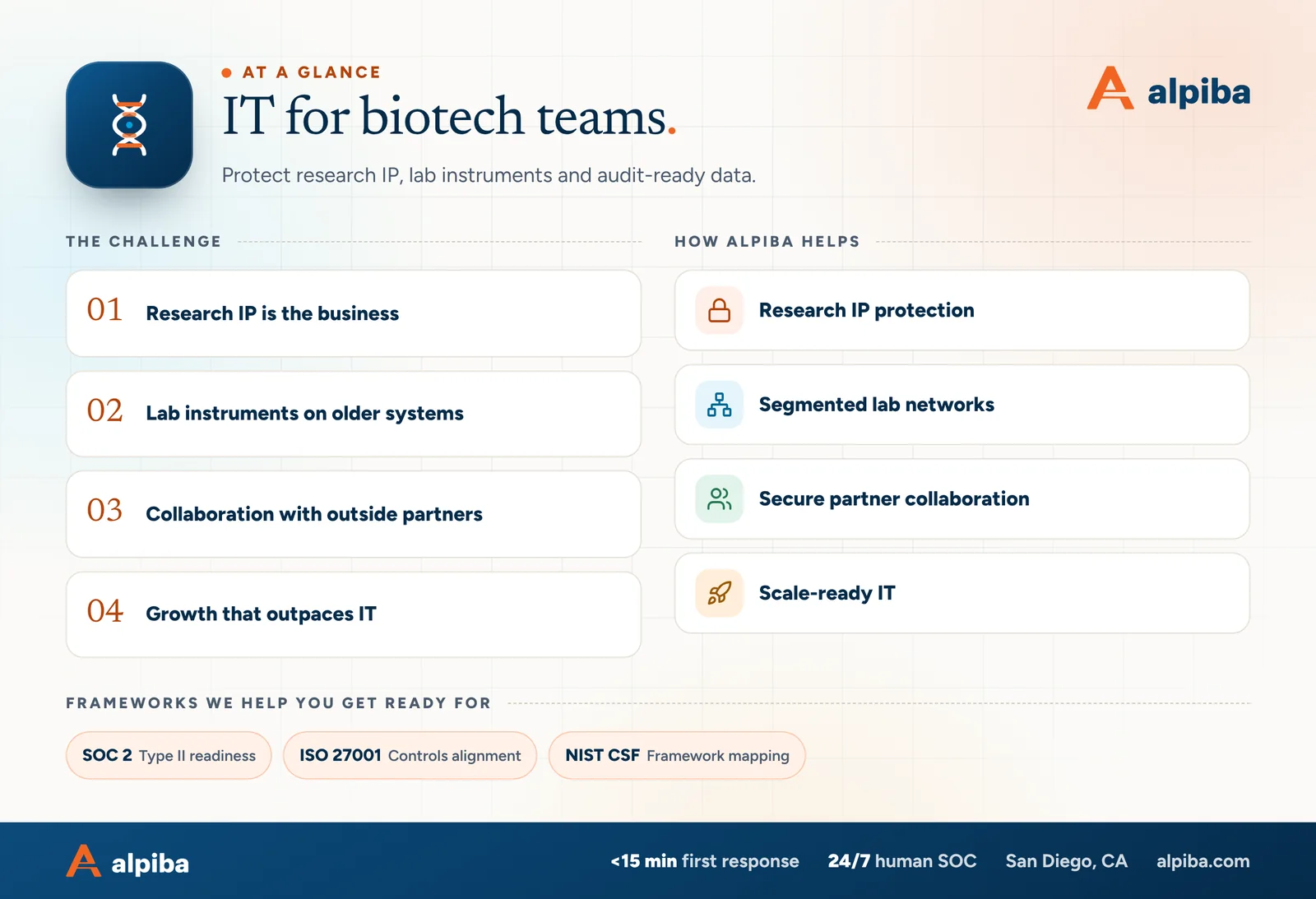
IT for biotech teams at a glance. Challenges: research ip is the business, lab instruments on older systems, collaboration with outside partners and growth that outpaces it. How Alpiba helps: research ip protection, segmented lab networks, secure partner collaboration and scale-ready it. Frameworks: SOC 2, ISO 27001 and NIST CSF.
IT for biotech teams at a glance.

The risks that matter most for biotech teams

Most incidents at research companies don't begin with a sophisticated attack on the science. They begin with ordinary gaps that a fast-growing team never had time to close.

Flat lab networks

When instrument PCs, freezer sensors, staff laptops and guest devices share one network, a single infected laptop can reach a control PC that cannot be patched. Segmentation protects the instrument without touching it.

Shared bench logins

One account used by everyone at an instrument breaks attribution, a core data integrity expectation. It also means a former employee's knowledge of that password still works.

Oversharing and departures

Anyone-with-the-link folders, personal cloud accounts and unmanaged laptops make it easy for research files to leave with a person. Offboarding that misses one of them leaves the door open.

USB as the data path

Moving instrument data on USB drives spreads malware onto machines that cannot run modern protection. It also leaves no record of what moved, when or by whom.

Unmanaged vendor access

Service engineers sometimes install their own remote access tools or connect a cellular modem to an instrument. Each one is an unmonitored path into the lab.

Payment and impersonation fraud

Finance and executive inboxes are targeted around financings and partnership news, when an unusual payment request feels plausible. MFA and a phone-verification rule for payment changes break the usual script.

Ransomware completes the list. Research data on a single network share without an immutable copy can be encrypted along with everything else, and rebuilding instrument PCs without saved configurations can take far longer than restoring files.

What good biotech IT looks like

Score yourself row by row. Most growing companies sit in the first column for some areas and the last for others; the aim is to close the gaps a partner's questionnaire or an attacker would find first.

Biotech IT maturity: where does your company stand?
AreaGetting bySolidPartner-ready
IdentityPasswords only, some shared accountsMFA on email and cloud, named accountsMFA everywhere, conditional access, quarterly access reviews on file
Lab instrumentsOn the office network, local admin, USB transfersInventoried and on a separate network segmentSegmented with written rules, controlled data path, logged vendor sessions
Research dataLaptops, personal drives, one file shareCentral storage with folder ownersOrganized by program, originals preserved, immutable backups tested quarterly
DevicesPersonally bought laptops, unmanagedStandard laptops with EDR and encryptionManaged from purchase to retirement, watched 24/7 by human analysts
CollaborationAttachments and open linksA shared site or drive per programGuest access per partner, expiring, reviewed and logged
EvidenceNothing until a questionnaire arrivesPolicies draftedControls mapped to NIST CSF or ISO 27001, evidence collected monthly
Change and peopleOnboarding from memoryChecklists for joiners and leaversSame-day access removal, change records near validated systems
Pick the row your next milestone depends on

If a partner questionnaire is due, the identity and evidence rows usually decide the outcome. If lab uptime is what keeps you awake, start with instruments and research data.

How Alpiba supports biotech and life sciences teams

Our biotech IT services in San Diego can run your IT end to end, or work alongside a first IT hire who needs security depth and after-hours cover. Either way, the work maps to the problems above.

  • Segmented lab networks. Network and server consulting designs instrument segments, firewall rules and a controlled data path from bench to storage, with diagrams your quality team can reference.
  • Identity and access. Zero-trust identity security puts MFA, conditional access and least-privilege roles on every account, including consultants and partner guests, and removes access the day someone leaves.
  • Monitoring around the clock. Our human-staffed 24/7 SOC watches laptops, servers, sign-ins, email and cloud apps, responds in under 15 minutes on average and opens a ransomware containment playbook within the first hour.
  • Research data recovery. Immutable off-site backups protect research data, notebook exports and instrument configurations, with documented RTO and RPO targets and restore drills every quarter.
  • Questionnaires and audits. Compliance readiness maps your controls to whatever your partners ask for, whether that is SOC 2 Type II readiness, ISO 27001 controls alignment or a NIST CSF mapping, and keeps evidence current between requests. That describes your readiness; it is not a certification of Alpiba.
  • Planning for growth. IT strategy and vCIO reviews each quarter connect the IT budget to hiring plans, new lab space and partner deadlines.

Every engagement runs through the same four stages: we learn the lab and its systems, design the changes, implement them in short windows scheduled around experiments, then protect and tune the environment with patching, monitoring and quarterly reviews. If something breaks mid-run, the person who picks up the phone is a senior engineer, not a ticket queue.

What we leave to your quality team

We don't perform computer system validation, write quality procedures or give regulatory advice. We provide the IT controls, change records and evidence your quality team and validation specialists rely on, and we coordinate every change near a validated system with them first.

Cover and two sample pages of The Biotech and Life Sciences IT Security Guide, a free 11-page PDF guide from Alpiba with a 24-point checklist
Inside The Biotech and Life Sciences IT Security Guide.

Technology choices for a growing lab

Patch or isolate

Patch what you can, isolate what you can't, and write down which is which. Office laptops and servers get updates on a regular schedule. Instrument PCs frozen by vendor support or validation get their own network segment, no internet access unless the vendor's support model needs it, application allow-listing where the vendor permits it and monitoring at the segment boundary.

  • Keep an inventory of every instrument PC: operating system, software version, vendor support status, owner and the data it produces.
  • Save configurations, methods and license files after each approved change, so a failed PC can be rebuilt to its validated state.
  • Give vendors one approved, time-limited and logged way in, instead of their own tools or a modem in the back of the instrument.

Local storage, cloud or both

Large instrument output usually lands on fast local storage near the lab, then moves to cloud storage for analysis, sharing and retention. The trade-off is speed and cost against resilience and access, and most labs need both. What matters is that the path is designed: the instrument writes locally, an automated job copies files to a staging share on the instrument segment, and only that share sends data onward, with originals left unaltered and every transfer logged.

One identity for every research app

Run Microsoft 365 or Google Workspace as the backbone, with one shared site or shared drive per program and per partner rather than personal folders. Connect your electronic lab notebook (ELN), laboratory information management system (LIMS) and other research apps through single sign-on, so MFA and offboarding apply to them automatically.

Alert first, then block

Data loss prevention rules can flag sensitive files leaving the company, but switching straight to blocking frustrates scientists who share legitimately with collaborators. Start in alert-only mode, learn the real sharing patterns for a few weeks, then block the flows that should never happen.

Facilities and power

Keep freezer and incubator alarms, sensors and building systems on their own segment, and put the network gear that carries those alarms on battery backup. Plan for outages, including the Public Safety Power Shutoffs SDG&E can call when wildfire risk is high: decide which instruments shut down gracefully, which stay up and who gets alerted.

A 90-day plan for a growing biotech

If you're moving from founder-managed IT to something a partner would sign off on, this order works. It front-loads the controls that reduce risk fastest and lets evidence build up as you go.

  1. Days 1–30: see everything, secure identity

    Inventory people, devices, instruments, cloud apps and where research data lives. Enforce MFA on email and cloud apps, retire shared accounts where the software allows, deploy managed EDR on every laptop and server that can run it and confirm research data has an off-site copy.

  2. Days 31–60: separate the lab

    Move instrument PCs and facility devices onto their own segments, replace USB transfers with a controlled data path and put vendor remote access behind approved, logged sessions. Restructure shared storage by program and partner, and clean up stale guest access.

  3. Days 61–90: prove it works

    Run a restore drill that includes rebuilding one instrument PC from its saved configuration. Map controls to the framework your partners use, collect evidence, write short policies that match what you actually do and schedule quarterly access reviews.

Close each phase with a one-page summary of what changed and what comes next. Leadership sees progress, your quality team sees the change history, and the summaries become useful evidence later.

Work back from your milestone

If a financing, partnership or audit date is fixed, plan backward from it. Reviewers generally want to see controls that have been operating for a while, not ones switched on last week.

How to evaluate an IT partner for your lab

Most providers can set up laptops and email. Fewer understand why you can't simply patch the mass spectrometer's PC, or what a partner's security team will ask next quarter. When you compare biotech IT services in San Diego, these questions separate the two:

  1. How would you protect an instrument PC that can't be updated without losing vendor support?
  2. How do you coordinate changes near validated systems with our quality team?
  3. If an alert fires at 3am on a Sunday, who looks at it, and how quickly?
  4. How do you control and log instrument vendor remote access?
  5. How often do you test restores, and how do you handle very large research data sets?
  6. Which frameworks can you map our controls to, and who keeps the evidence between questionnaires?
  7. Do you provide on-site support in Torrey Pines and Sorrento Valley, or remote only?

Red flags

  • A plan to push the same updates to every PC in the building, instruments included.
  • A single flat network proposed for a new lab because it is simpler to manage.
  • No answer for how changes near validated systems will be recorded.
  • Backups described in terms of software features, with no restore test dates.

To see how your lab and data path measure up, book a free 30-minute assessment. We'll talk through instruments, identity and research data with you and point out the quick wins, with no obligation.

Illustration of the San Diego skyline at sunset, with downtown towers, the bridge across the bay, sailboats and palm trees
San Diego, where Alpiba is based.

Talk to an engineer

Free 30-minute assessment. We reply within 12–24 hours.

Fields marked * are required. By submitting, you agree that Alpiba may contact you about your request. We reply within 12–24 hours; for an active incident, call 858-399-4225.

Compliance context

Frameworks that matter for biotech teams.

Partners, investors and acquirers increasingly send security questionnaires. Alpiba helps you design, implement and evidence the controls behind your answers.

SOC 2Type II readiness
ISO 27001Controls alignment
NIST CSFFramework mapping

Framework references describe the standards Alpiba builds toward for client environments. They indicate readiness and controls alignment, not third-party attestation of Alpiba itself.

Recommended services

The services biotech teams rely on most.

All services
A padlock resting on a laptop keyboard

Cybersecurity

Zero Trust & Identity Security

Identity-aware access, MFA everywhere and least privilege baked into every environment we manage.
Ethernet cables plugged into a network switch

Infrastructure & Continuity

Network & Server Consulting

Design, optimize and secure your infrastructure for maximum uptime and performance.
A team in a working session around a conference table

Compliance & Risk

Compliance Readiness

Design, implement and evidence the controls auditors and insurers ask for, and keep the audit trail ready.
A close view of a computer circuit board

Infrastructure & Continuity

Backups & Business Continuity

Immutable backups, tested restore plans and disaster recovery playbooks so your business stays online.

Two business partners reviewing plans together at a laptop

Managed IT

IT Strategy & vCIO

Enterprise-grade technology leadership without a full-time CIO: roadmap, budget and risk, reviewed quarterly.

Cover of The Biotech and Life Sciences IT Security Guide, a free PDF guide

Free guide · PDF

The Biotech and Life Sciences IT Security Guide

A printable guide for founders, lab managers and operations leads: secure instruments that can't be patched, protect IP as the team grows and answer partner questionnaires with evidence.

  • A starter data map for research data, instruments and IP
  • Instrument PC protection steps that respect validation
  • A self-assessment checklist for identity, lab networks, data and evidence
  • A 90-day plan, a plain-English glossary and 10 questions for any IT provider
Preview what's inside

Get the free guide

Instant download. By submitting, you agree that Alpiba may contact you about this guide; you can ask us to delete your details at any time.

FAQ

Biotech IT questions, answered.

Straight answers to the questions we hear most. Still curious? Talk to a senior engineer.

What do biotech IT services in San Diego include?

They combine everyday managed IT with lab-specific work: helpdesk and on-site support, segmented networks for instrument PCs, MFA and access control, 24/7 security monitoring, backups for research data and evidence for partner security reviews. Alpiba provides this as a full outsourced IT department or alongside your in-house IT. First response averages under 15 minutes, and on-site support covers Torrey Pines, Sorrento Valley, UTC and North County.

How do you protect research IP and confidential data?

We layer controls so that no single failure exposes your science. Research data lives in company-owned storage organized by program, with least-privilege access and MFA on every account. Data loss prevention flags sensitive files leaving the company, managed EDR runs on every device that supports it, external sharing is governed and our 24/7 SOC watches for unusual access or large downloads. Access ends the day someone leaves.

Can you secure lab instruments that run older operating systems?

Yes. When an instrument PC can't be updated without losing vendor support or triggering revalidation, we protect it from the outside: its own network segment, no internet access it doesn't need, a controlled data path instead of USB drives and monitoring at the segment boundary. The instrument keeps running as installed, and an infected laptop elsewhere in the company can't reach it directly.

Does Alpiba perform 21 CFR Part 11 validation?

No. Computer system validation and Part 11 decisions belong to your quality team and validation specialists. We provide the IT controls they rely on, such as named user accounts, synchronized clocks, access reviews, documented change records near validated systems and backups that preserve original files and metadata. We also agree a change process with your quality lead, so IT work never surprises a validated system.

Does a biotech company need SOC 2?

Not always. SOC 2 is built for service organizations, so it's most often requested from biotechs that host partner data or sell a platform, data or analytics service. Many therapeutics companies answer partner questionnaires with a documented control set mapped to NIST CSF or ISO 27001 instead. We help with readiness and evidence either way, and only an independent auditor can issue a SOC 2 report.

How should a biotech startup set up IT from day one?

Start with company-owned accounts, devices and storage rather than personal ones. Put everyone on Microsoft 365 or Google Workspace under the company domain with MFA enforced, buy standard laptops that are encrypted and managed, keep research data in shared storage the company controls and back it up off-site. These choices cost little at five people and prevent a painful cleanup at fifty.

Can IT keep up with rapid hiring and new lab space?

Yes, if the basics are standardized before the hiring wave arrives. Onboarding and offboarding workflows, standard device builds, procurement handled for you and network designs that extend cleanly to new benches mean new hires start ready on day one. Quarterly business reviews tie IT plans to your hiring plan, financing timeline and any move to a larger site.

Do you help with partner and investor security questionnaires?

Yes. We put the controls in place first, then gather the proof reviewers ask for: MFA reports, device encryption status, backup test results and access reviews. That work can target SOC 2 Type II readiness, ISO 27001 controls alignment or a NIST CSF mapping, depending on who is asking, so your answers describe controls that are running today rather than plans.

How should instrument vendors get remote access?

Through one approved method that you control, rather than tools they install themselves. Each session is requested, approved by someone on your team, protected with MFA, limited to the specific instrument, time-limited and logged. We also look for cellular modems or always-on connections added during installation. Vendors still get what they need to support the instrument, without a standing path into your lab.

Should research data live on-premises or in the cloud?

Usually both, by design. Large instrument output often lands on fast local storage near the lab, then moves to cloud storage for analysis, collaboration and long-term retention. What matters is that the path is controlled, originals stay unaltered, ownership is clear by program and an immutable copy exists outside your network. We design that path around your data volumes, budget and partners.

What happens if ransomware hits our lab?

Containment comes first: within the first hour, our SOC starts a documented ransomware playbook that cuts infected devices and accounts off from everything else. Instrument PCs on their own segment stay out of reach of an infected laptop. Critical systems come back from immutable off-site copies against a typical RTO of under 4 hours, and saved configurations let us rebuild a control PC to its validated state.

Do you provide on-site IT support in Sorrento Valley and Torrey Pines?

Yes. We're based in San Diego and offer on-site support around Torrey Pines, Sorrento Valley, UTC, La Jolla and North County, plus remote support for anything that doesn't need hands on hardware. Lab work often does, such as moving an instrument PC onto a new network segment or setting up network gear for a new bench, and we schedule it around your experiments.

Free 30-minute assessment

Talk to an engineer who knows biotech teams.

Tell us a little about your business. A senior engineer will map your top risks, quick wins and a right-sized plan, with no obligation and no sales pressure.

  • A senior engineer, not a salesperson
  • Reply within 12–24 hours
  • Flat per-user pricing if you want our help
Roopa, founder of Alpiba

Founder-led and San Diego basedRoopa founded Alpiba to give growing businesses a real technology partner.

858-399-4225Mon–Fri, 7am–7pm PT · 24/7 for managed clients
info@alpiba.comReply within 12–24 hours

Fields marked * are required. By submitting, you agree that Alpiba may contact you about your request. We reply within 12–24 hours; for an active incident, call 858-399-4225.

Call Free assessment