SOC online 24/7Breach or outage? Call 858-399-4225

Free guidesinfo@alpiba.comMon–Fri, 7am–7pm PT

Alpiba

Compliance & Risk

Vulnerability assessment services that rank what to fix first, then help you fix it.

We scan and review your systems, cloud settings and network for weaknesses, rank what matters most and fix it with you, before someone else finds it.

<15 min average first response Flat per-user pricing Free guide: The Vulnerability Management Starter Guide

Hands working on a laptop during a review

Quick answer

What is a vulnerability assessment?

A vulnerability assessment is a systematic review of your devices, applications, cloud configuration and network to find security weaknesses, such as missing patches, misconfigurations and exposed services, then prioritize them by risk. Vulnerability assessments are part of Alpiba's cybersecurity service and the security assessments we run for new clients.

What's included

Everything in Vulnerability Assessments.

One accountable team delivers every piece below, documented and reviewed with you every quarter.

  • Internal & external scanning

    What's exposed to the internet and what's weak inside.

  • Cloud configuration review

    Microsoft 365 and Google Workspace settings checked against best practice.

  • Patch gap analysis

    Missing updates and unsupported software identified.

  • Prioritized findings

    Ranked by real risk, not just a long list.

  • Remediation plan

    Clear next steps, owners and timelines.

  • Fix support

    We help close the gaps, not just report them.

Why it matters

Know your risk before attackers do.

Attackers scan for easy targets constantly. A regular assessment shows you the same view they have and gives you a ranked plan to close the doors that matter most.

  • Findings ranked by risk
  • Plain-English report
  • Evidence for insurers and auditors
  • Remediation, not just reporting
Findings by severityExample
Critical2
High5
Medium11
Low19

Ranked by real risk, with a remediation plan for every critical and high finding.

Outcomes

What you can expect.

See your real risk

A clear picture of what's exposed.

Fix what matters first

Effort focused on the highest-risk gaps.

Evidence on file

Reports insurers and auditors recognize.

The complete guide

Vulnerability assessment services, explained.

11 min readBy the Alpiba teamUpdated October 15, 2026

On this page

Automated tools scan the internet around the clock, looking for an unpatched firewall, a forgotten remote access page or a cloud setting left open. Vulnerability assessment services in San Diego give you that same view first, from outside your network and inside it, so you can close the gaps that matter before someone else finds them.

A useful assessment is not a long export from a scanning tool. It is a ranked list of what is exposed, why it matters to your business, who should fix it and by when, followed by help with the fixes and a re-check that proves they worked.

Below we explain what an assessment covers and what it doesn't, internal versus external scanning, how we rank findings by real risk, the remediation and re-testing workflow, how often to assess, and how the results support cyber insurance renewals and compliance readiness. If an insurer, auditor or large customer has started asking security questions you can't yet answer with evidence, this is usually the right place to start.

What a vulnerability assessment covers

A vulnerability assessment is a structured review that finds, validates and ranks security weaknesses across your environment. Our vulnerability assessment services in San Diego start by agreeing the scope with you, so the work concentrates on the systems that hold your data and keep the business running.

External attack surface

Everything reachable from the internet: firewalls, VPN gateways, remote access pages, websites and email records. This is the view an outsider has of your business.

Internal network and devices

Servers, laptops, printers, cameras and network equipment, scanned from inside. It shows how far an attacker could get after one bad click.

Cloud configuration

Microsoft 365 and Google Workspace settings checked against best practice, including MFA coverage, admin roles, external sharing and mail forwarding.

Patch and lifecycle gaps

Missing updates and software past its end-of-support date. Windows 10 machines that aren't enrolled in Extended Security Updates are a current example.

Key applications

The systems you can't run without, such as practice management, document management or ERP, reviewed for exposure and update status.

Every San Diego business has its own version of this map. A biotech lab near Torrey Pines may run instrument PCs on older operating systems because the vendor software requires it. A manufacturer in Otay Mesa may have production equipment and handheld scanners on the same network as office laptops. A law firm in Downtown San Diego may have a document server nobody has patched since the person who set it up moved on.

What an assessment doesn't do

  • It doesn't try to break in or prove impact. That is deeper, manual testing, covered in the next section.
  • It doesn't test how staff respond to phishing. That is the job of phishing simulation and training.
  • It doesn't review the source code of software you build.
  • It doesn't certify you as compliant. Auditors issue reports; an assessment gives you evidence to show them.
  • It doesn't cover systems outside the agreed scope, which is why scoping comes first.

Vulnerability assessment vs penetration test

The two are often confused because both look for weaknesses, but they answer different questions. An assessment asks which weaknesses you have and which matter most. A penetration test asks what a skilled attacker could actually achieve by exploiting some of them.

How the two compare
QuestionVulnerability assessmentPenetration test
GoalFind and rank weaknesses across the whole environmentProve the impact of specific weaknesses by trying to exploit them
ApproachAutomated scanning plus expert review and validationManual testing by specialists within agreed rules of engagement
CoverageBroad: every system in scopeDeep: selected targets and attack paths
Disruption riskLow when scans are scheduled and tunedHigher, so it needs careful planning and sign-off
Typical rhythmRegularly, and after major changesOften yearly, or when a contract, auditor or insurer asks
Best forOngoing risk reduction and a record of regular reviewTesting your defenses once the known gaps are closed

For most growing businesses the assessment comes first. Fixing known weaknesses before any deeper test means the testers spend their time on harder questions, and you aren't paying specialists to tell you a firewall needs an update. If a customer contract or auditor calls for that kind of testing, we'll help you work out what scope you actually need.
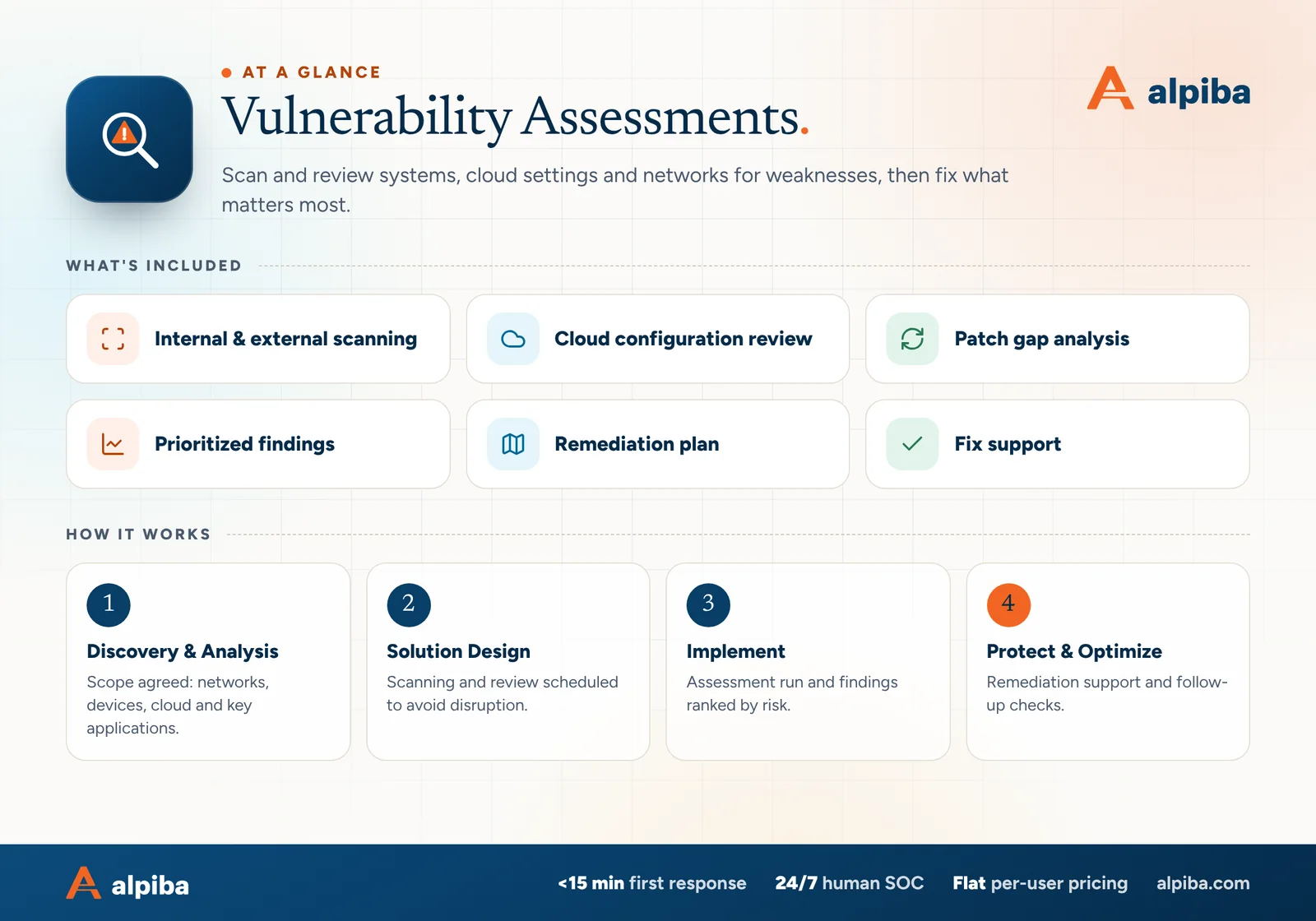
Vulnerability Assessments at a glance. Included: Internal & external scanning, Cloud configuration review, Patch gap analysis, Prioritized findings, Remediation plan and Fix support. How it works: Discovery & Analysis, Solution Design, Implement and Protect & Optimize.
Vulnerability Assessments at a glance: what is included and how we roll it out.

Internal vs external scanning

External scanning shows what anyone on the internet can see. Internal scanning shows what an attacker, or malware, could reach after getting a foothold, for example through a phishing email. You need both: the outside view tells you how someone might get in, and the inside view tells you how far they could go.

What external scanning often finds

  • Remote desktop or admin login pages exposed directly to the internet
  • Firewall or VPN software with known, published vulnerabilities
  • Expired certificates and outdated encryption settings
  • Forgotten subdomains and DNS records pointing at services you no longer use
  • Missing or weak SPF, DKIM and DMARC records

What internal scanning often finds

  • Missing operating system and application patches
  • Unsupported operating systems and old servers still holding data
  • Default passwords on printers, cameras and network equipment
  • Old file-sharing protocols, such as SMBv1, still switched on
  • A flat network where any device can reach any server

External scanning also catches what an asset list misses. A developer stands up a test site on a subdomain, a marketing agency puts up a landing page on your domain, or a vendor opens a port for remote support and never closes it. None of those appear in your records, but all of them are visible from the internet.

Internal scans are most accurate when they are credentialed, meaning the scanner signs in to each device with a dedicated scanning account. That shows missing patches precisely and produces far fewer false alarms than probing each device from the outside.

Fragile systems get special handling

Lab instruments, imaging equipment and production machines can react badly to aggressive scans. We agree timing in advance, scan them gently or review them manually, and plan it with your operations team first.

Prioritizing findings by real risk

Every scanner assigns a severity score, usually based on CVSS, the Common Vulnerability Scoring System, which rates flaws on a 0–10 scale. The score describes the flaw in general, not the risk to you. A critical finding on an isolated test machine can matter less than a medium one on the VPN gateway everyone uses to connect.

  • Exposure. Can the system be reached from the internet, or only from inside the network?
  • Known exploitation. Is the flaw being used in real attacks? CISA's Known Exploited Vulnerabilities catalog is a free public list that answers this.
  • Asset importance. Does the system hold client files, patient records or finance access, or is it a spare laptop?
  • Compensating controls. Do MFA, endpoint protection or segmentation reduce the real-world risk until a fix is in place?
  • Effort. Some high-value fixes take minutes, and those go first.
How findings are ranked and scheduled
PriorityWhat typically lands hereSuggested response
Fix nowKnown exploited flaws on internet-facing systems, exposed admin pages, admin accounts without MFAAn emergency change, measured in days
Fix this cycleHigh-severity internal flaws and unsupported systems holding sensitive dataThe next maintenance window, within 30 days
ScheduleMedium findings, hardening gaps and configuration driftPlanned work within the quarter
Accept or monitorLow-risk findings, or flaws with no fix available yetDocumented with an owner, a reason and a review date

Ranking in practice

Imagine two findings. One is a critical flaw on a lab PC that sits on an isolated instrument network. The other is a medium-severity flaw in the firewall's remote access portal that appears in the Known Exploited Vulnerabilities catalog. The firewall goes first because it is exposed and actively exploited; the lab PC is scheduled, and its isolation is confirmed in the meantime.

Ask why, not just what

Every finding in a good report explains why it sits where it does. If a report can't say why something is critical for your business, it is a scan export, not an assessment.

From findings to fixes: remediation and re-testing

A report on its own doesn't reduce risk; fixes do. Our assessments include a remediation plan with owners and timelines, and we help close the gaps rather than handing you a list.

  1. Walk through the results

    We review findings with you in plain English and confirm the business context: which systems matter most, which are fragile and which belong to vendors.

  2. Assign owners and dates

    Each finding gets an owner, whether our team, your IT staff or a vendor, and a target date in the remediation plan.

  3. Fix in safe batches

    Patches, configuration changes and retired services go out in maintenance windows, with a rollback plan for anything risky.

  4. Document exceptions

    When something can't be fixed yet, such as an instrument PC tied to vendor software, we record the risk, the reason and the compensating controls, such as isolating it on its own network.

  5. Re-test and close

    Follow-up checks confirm each fix worked. The updated report becomes your record that issues were found and resolved.

When the fix belongs to a vendor, such as the company behind your imaging or practice management software, we help you raise it with them and track it to closure. When the same kind of finding keeps returning, the cause is usually structural: patch management that slipped, or a network that grew without a plan. We fold those causes into ongoing work, such as managed IT with routine patching, so the fix outlasts the report.

Cover and two sample pages of The Vulnerability Management Starter Guide, a free 13-page PDF guide from Alpiba with a 25-point checklist
Inside The Vulnerability Management Starter Guide.

How often to assess

Risk changes every time you add a system, a user or a cloud app, so a single annual snapshot goes stale quickly. A sensible rhythm for a growing business looks like this.

A practical assessment rhythm
ActivitySuggested rhythmWhy
Full assessment: internal, external and cloudAt least once a yearA complete, documented picture for leadership, insurers and auditors
External scanQuarterly, or monthly if you run many internet-facing systemsYour outside view changes whenever a vendor or project opens something new
Patch status reviewMonthly, alongside routine patchingCatches devices that missed updates before the gaps pile up
Cloud configuration reviewTwice a year and after big changesMicrosoft 365 and Google Workspace settings drift as apps and features are added
Targeted re-scanAfter every major changeConfirms that new systems and fixes are configured as intended

Assess again outside the normal rhythm when any of these happen:

  • You open a new office, lab or warehouse, such as a second site in Carlsbad or a warehouse in Chula Vista
  • You migrate email or files to Microsoft 365 or Google Workspace
  • You acquire a company or merge networks
  • You have a security incident, or a key vendor reports a breach
  • A large customer sends a security questionnaire, or your cyber insurance renewal is due

If you take card payments, PCI DSS can require quarterly external scans by an Approved Scanning Vendor (ASV), depending on how payments are processed. Those scans must come from an approved vendor; an assessment beforehand helps you find and fix issues so there are fewer surprises when they run.

How results support cyber insurance and compliance readiness

Cyber insurance applications commonly ask about patching, vulnerability scanning and exposed remote access, and some insurers scan applicants' internet-facing systems themselves. A recent assessment with a record of what was fixed lets you answer accurately rather than optimistically. Our cyber insurance readiness check lists the controls insurers commonly ask about.

  • HIPAA. The Security Rule requires a risk analysis and ongoing risk management. Assessment results feed both.
  • SOC 2. For a Type II report, auditors look for evidence that vulnerabilities were found and addressed throughout the audit period, not just before it.
  • PCI DSS. Requires regular vulnerability scanning of the systems in scope for card data.
  • NIST CSF 2.0. Places vulnerability identification within the Identify function's risk assessment category.
  • ISO 27001. Includes an Annex A control for managing technical vulnerabilities.

Customer security questionnaires ask the same things. Biotech companies working with larger pharmaceutical partners and software firms selling to enterprises are routinely asked whether they scan for vulnerabilities, how quickly they patch and who reviews the results. A dated report and a remediation record let you answer with evidence instead of a promise.

We help you prepare and evidence these controls through compliance readiness work. Auditors issue the reports, insurers make their own decisions, and HIPAA compliance remains your organization's responsibility.

Choosing vulnerability assessment services in San Diego

Scanning tools are similar everywhere. The difference is in scoping, judgment and follow-through, so ask any provider these questions.

  • Do you scan from outside and inside, and are internal scans credentialed?
  • Is our Microsoft 365 or Google Workspace configuration reviewed, not just servers?
  • How do you rank findings beyond the severity score?
  • Who walks us through the results, and is it in plain English?
  • Is fix support included, or do we just receive a report?
  • Do you re-test to confirm that fixes worked?
  • How do you handle fragile systems such as lab, imaging or production equipment?
  • What will we have afterwards that an insurer or auditor will recognize?

Scope drives cost: the number of devices and internet-facing systems, how many sites and cloud tenants are included, and how much remediation follows. For managed clients, vulnerability assessments are part of our cybersecurity service and the security assessments we run for new clients. Larger fixes, such as replacing an unsupported server, are scoped as projects before work starts.

Not the same as our free assessment

Our free 30-minute assessment is a conversation about your risks and priorities, not a technical scan. It is the quickest way to scope a vulnerability assessment properly.

Illustration of the San Diego skyline at sunset, with downtown towers, the bridge across the bay, sailboats and palm trees
San Diego, where Alpiba is based.

Mistakes that make assessments less useful

  • Scanning once and filing the report. Findings age quickly, and an untouched report documents risks you knew about and didn't address.
  • Treating every critical the same. Rank by exposure, exploitation and business impact, not by score alone.
  • Leaving the cloud out. Microsoft 365 and Google Workspace settings are part of your attack surface too, and one permissive setting can expose more data than a single missing patch.
  • Excluding what you can't patch. Isolate and document it instead. An excluded system is still on your network.
  • Skipping the re-test. A fix that hasn't been verified is an assumption.
  • Trusting default scan settings. Out-of-the-box profiles can skip credentialed checks and cloud settings, and can be too aggressive for fragile equipment. Tune the scan to the environment.
  • Scanning without telling anyone. Agree timing with operations and vendors, so a scan never interrupts a production run or gets mistaken for an attack.

Talk to an engineer

Free 30-minute assessment. We reply within 12–24 hours.

Fields marked * are required. By submitting, you agree that Alpiba may contact you about your request. We reply within 12–24 hours; for an active incident, call 858-399-4225.

How it works

From first call to fully protected.

  1. Discovery & Analysis

    Scope agreed: networks, devices, cloud and key applications.

  2. Solution Design

    Scanning and review scheduled to avoid disruption.

  3. Implement

    Assessment run and findings ranked by risk.

  4. Protect & Optimize

    Remediation support and follow-up checks.

Signs you need it

Sound familiar?

If two or more of these ring true, a 30-minute assessment will show you where to start.

Book a free assessment
  • You've never had a security assessment
  • Patching is inconsistent
  • You're preparing for SOC 2 or a cyber insurance renewal
  • You've added cloud apps without a security review
  • A recent incident shook confidence

From our founder

“SMBs deserve a strategic technology partner, without enterprise complexity or cost.”

Roopa · Founder, Alpiba · former Accenture advisor

Alpiba is founder-led. Every Vulnerability Assessments engagement starts by listening to how your business runs, and senior engineers stay with you from the first call onward.

Roopa, founder of Alpiba, standing in front of evening city lights
Cover of The Vulnerability Management Starter Guide, a free PDF guide

Free guide · PDF

The Vulnerability Management Starter Guide

A practical starter guide for owners and IT leads: build an asset inventory, set a scanning rhythm, rank findings by real risk and keep the records insurers and auditors ask for.

  • The vulnerability management cycle in plain English
  • An asset inventory template and a starter scanning schedule
  • A simple method for ranking findings by real risk
  • Remediation and exception templates, a checklist and a 90-day plan
Preview what's inside

Get the free guide

Instant download. By submitting, you agree that Alpiba may contact you about this guide; you can ask us to delete your details at any time.

FAQ

Vulnerability Assessments questions, answered.

Straight answers to the questions we hear most. Still curious? Talk to a senior engineer.

How is a vulnerability assessment different from a penetration test?

A vulnerability assessment finds and ranks weaknesses across your whole environment, while a penetration test has specialists try to exploit selected weaknesses to prove what an attacker could achieve. Assessments are broad and regular; penetration tests are deep and less frequent. Fixing assessment findings first means any later testing can focus on harder problems, and we'll help you decide which your goals require.

Is a vulnerability scan the same as a vulnerability assessment?

No. A scan is the automated part: a tool checks systems against known weaknesses and produces a list. An assessment adds scoping, validation to weed out false positives, ranking by real business risk, a plain-English explanation and a remediation plan with owners and dates. A scan tells you what a tool found; an assessment tells you what to do about it.

Will vulnerability scanning disrupt our systems?

It shouldn't. Scans are scheduled and tuned to avoid disruption, and we agree timing with you in advance. Fragile systems such as lab instruments, imaging equipment or production machines can be scanned gently, scanned outside working hours or reviewed manually instead. Your team knows when scanning will happen, so nobody mistakes it for an attack.

What do we receive at the end of a vulnerability assessment?

You receive a plain-English report with findings ranked by real risk, a remediation plan with owners and target dates, and a walkthrough of the results with our team. As fixes are made, follow-up checks confirm them and the report is updated, so it doubles as evidence for insurers, auditors and customer security questionnaires.

How often should a small business get a vulnerability assessment?

At least once a year, plus after major changes such as a new office, a cloud migration or an acquisition. Between full assessments, quarterly external scans and monthly patch reviews keep the picture current. Many frameworks and insurers expect regular assessment, and businesses that take card payments may have quarterly scanning requirements under PCI DSS.

What is the difference between internal and external vulnerability scanning?

External scanning looks at your business from the internet, the way an outsider would, and finds exposed login pages, outdated firewalls and weak email records. Internal scanning runs inside your network and finds missing patches, unsupported systems, default passwords and how far an attacker could move after compromising one device. Each catches problems the other misses, so a complete assessment includes both.

How much do vulnerability assessment services in San Diego cost?

The cost of vulnerability assessment services in San Diego depends mostly on scope: how many devices and internet-facing systems you have, how many sites and cloud tenants are included, and how much remediation follows. For managed clients, assessments are part of our cybersecurity service, priced per user with no surprise line items. We scope everything after a free 30-minute assessment.

Do we need a vulnerability assessment for cyber insurance?

Not always by name, but insurers commonly ask about patching, vulnerability scanning and exposed remote access, and some scan your internet-facing systems during underwriting. A recent assessment with a record of fixes lets you answer the application accurately and shows the controls are real. Insurers make their own decisions; an assessment helps you present an honest, defensible picture.

Does a vulnerability assessment help with HIPAA or SOC 2?

Yes. HIPAA's Security Rule requires a risk analysis and ongoing risk management, and assessment results are core input for both. SOC 2 auditors look for evidence that vulnerabilities are identified and addressed over time, which a scan, fix and re-test record provides. We help you prepare that evidence; auditors issue reports, and HIPAA compliance remains your organization's responsibility.

Do you fix the vulnerabilities you find?

Yes, we help close the gaps rather than just reporting them. Fix support covers patching, configuration changes and retiring unused services, coordinated with your IT staff and vendors, and every fix is re-checked. Larger work, such as replacing an unsupported server, is scoped as a separate project and agreed with you before it starts, so there are no surprise costs.

What if a vulnerability can't be patched?

Then we reduce the risk another way and document it. Common options include isolating the system on its own network segment, restricting who and what can reach it, adding monitoring or planning a replacement. The decision, the reason and a review date go into your remediation plan, so accepted risks are deliberate choices rather than forgotten findings.

Do you review Microsoft 365 and Google Workspace settings?

Yes. Cloud configuration review is part of the assessment. We check settings such as MFA coverage, admin roles, external sharing, mail forwarding and email authentication against best practice, because one permissive cloud setting can expose more data than a missing patch on a single laptop. Findings are ranked alongside everything else, so cloud fixes get the same attention as server fixes.

Related services

Works best together.

All services
A team in a working session around a conference table

Compliance & Risk

Compliance Readiness

Design, implement and evidence the controls auditors and insurers ask for, and keep the audit trail ready.

A close view of a glowing circuit board

Cybersecurity

Cybersecurity & Ransomware Defense

24/7 monitoring, threat hunting and rapid incident response that contains attacks before they impact your business.
Ethernet cables plugged into a network switch

Infrastructure & Continuity

Network & Server Consulting

Design, optimize and secure your infrastructure for maximum uptime and performance.

Free 30-minute assessment

Ready for Vulnerability Assessments? Let's talk.

Tell us about your business and what prompted the search. A senior engineer will reply within 12–24 hours to set up your free 30-minute assessment.

  • A senior engineer, not a salesperson
  • Reply within 12–24 hours
  • Flat per-user pricing if you want our help
Roopa, founder of Alpiba

Founder-led and San Diego basedRoopa founded Alpiba to give growing businesses a real technology partner.

858-399-4225Mon–Fri, 7am–7pm PT · 24/7 for managed clients
info@alpiba.comReply within 12–24 hours

Fields marked * are required. By submitting, you agree that Alpiba may contact you about your request. We reply within 12–24 hours; for an active incident, call 858-399-4225.

Call Free assessment