

Holiday phishing scams aimed at small businesses copy the messages you expect in November and December: delivery notices, supplier invoices, e-signature requests, bonus and benefits emails, QR codes and urgent texts or calls. Stop them with filtered email, MFA, a one-click report button, a short staff briefing, and a rule to verify every money or login request another way.
- Holiday phishing copies real seasonal email: deliveries, invoices, e-signatures, bonuses and benefits.
- Bad grammar is no longer a reliable tell; AI tools now write clean, convincing messages.
- The strongest red flag is a request to pay, sign in or change details through a link or number the message supplies.
- A one-click report button and a no-blame culture turn staff into an early-warning system.
- If someone clicks, the first hour matters most: reset, revoke sessions and check mailbox rules.
It is the first Tuesday in December. Your receptionist gets a text saying a package for the office could not be delivered. Accounts payable opens a PDF called “Invoice_Final_Dec” from a supplier they actually use. And the office manager receives an e-signature request to “review and sign the 2026 bonus schedule.” All three arrive before 10 a.m., and all three are fake.
That is how holiday phishing scams work against businesses. They do not look strange. They look exactly like the shipping, billing and HR email that floods every inbox from mid-November to New Year’s, which is why busy, careful people still click.
Below: the seven lures to expect this season, the red flags for each, an 8-step plan to stop them, and what to do if someone clicks. It goes deeper on the messages themselves than our peak-season holiday cybersecurity checklist.
Why holiday phishing scams spike in November and December
Phishing works best when the fake matches what people expect. In December, everyone expects tracking updates, year-end invoices, signatures and benefits reminders. Approvals get rushed, email gets read on phones, and the colleague who would normally double-check is on vacation.
Texts are a growing share of the problem. The FTC’s analysis of the top text scams of 2024 found people reported losing $470 million to text scams that year, more than five times the 2020 figure, and fake package delivery problems were the most reported text scam of all.
The writing has improved, too. In a December 2024 public service announcement on generative AI fraud, the FBI warned that criminals use AI to produce convincing messages faster and to remove the spelling and grammar mistakes that used to give scams away. “It looked professional” proves nothing.
7 holiday phishing lures and their red flags
Each lure targets a different person in your business. Share this section with whoever is most likely to see it.
1. Fake delivery and shipping notices
“Delivery attempt failed” or “pay a small redelivery fee.” These hit front desks, warehouses and anyone ordering supplies. Red flags: a tracking link on an odd or shortened domain, a fee to release a package, and a carrier you were not expecting. Check the order on the retailer’s or carrier’s own site instead.
2. Fake invoices and purchase orders
Year-end billing gives cover to “past due” notices, “revised” invoices and new purchase orders, often as a PDF or a “view document” link. Manufacturers and logistics firms see fake POs; biotech labs see fake supplier and reagent invoices. Red flags: a login page to open an invoice, a slightly changed sender domain, and new bank details.
3. Fake e-signature requests
Messages styled after popular e-signature services ask someone to “review and sign” an agreement, NDA or year-end document. They are especially effective at law firms, where signing documents is routine. Red flags: a document you were not expecting, a request to enter your email password to view it, and a sender who is not the person you are working with.
4. Fake HR bonus and open-enrollment emails
“Your 2026 bonus letter is ready” or “confirm your benefits before the deadline.” These work because people want to open them. Red flags: a link to a login page outside your normal HR or payroll system, and any request to update direct-deposit details by email.
5. QR-code phishing
A QR code in an email or PDF moves the risky link from a filtered work inbox to a personal phone. The FTC’s QR code scam alert lists fake delivery problems and account security warnings among the common excuses. Red flags: any QR code you were not expecting, especially one that leads to a sign-in page.
6. Smishing and vishing
Smishing is phishing by text; vishing is by phone. A caller posing as “IT support” may ask for an MFA code, or a text from “the bank” may ask staff to confirm a payment. Red flags: pressure, secrecy, and any request for a code, password or remote access.
7. AI-written, personalized messages
Attackers use public details from your website and LinkedIn to write polished messages that mention real projects and colleagues. Red flags: a familiar name with an unfamiliar request, and urgency that discourages you from checking.
For a refresher on the basics (sender addresses, link previews, attachments), our guide on how to identify phishing emails is a good companion to this list.
Would your inbox catch a fake holiday invoice?
A senior Alpiba engineer will review your email filtering, MFA, reporting setup and sign-in alerts, then give you a short, plain-English list of what to tighten before December.
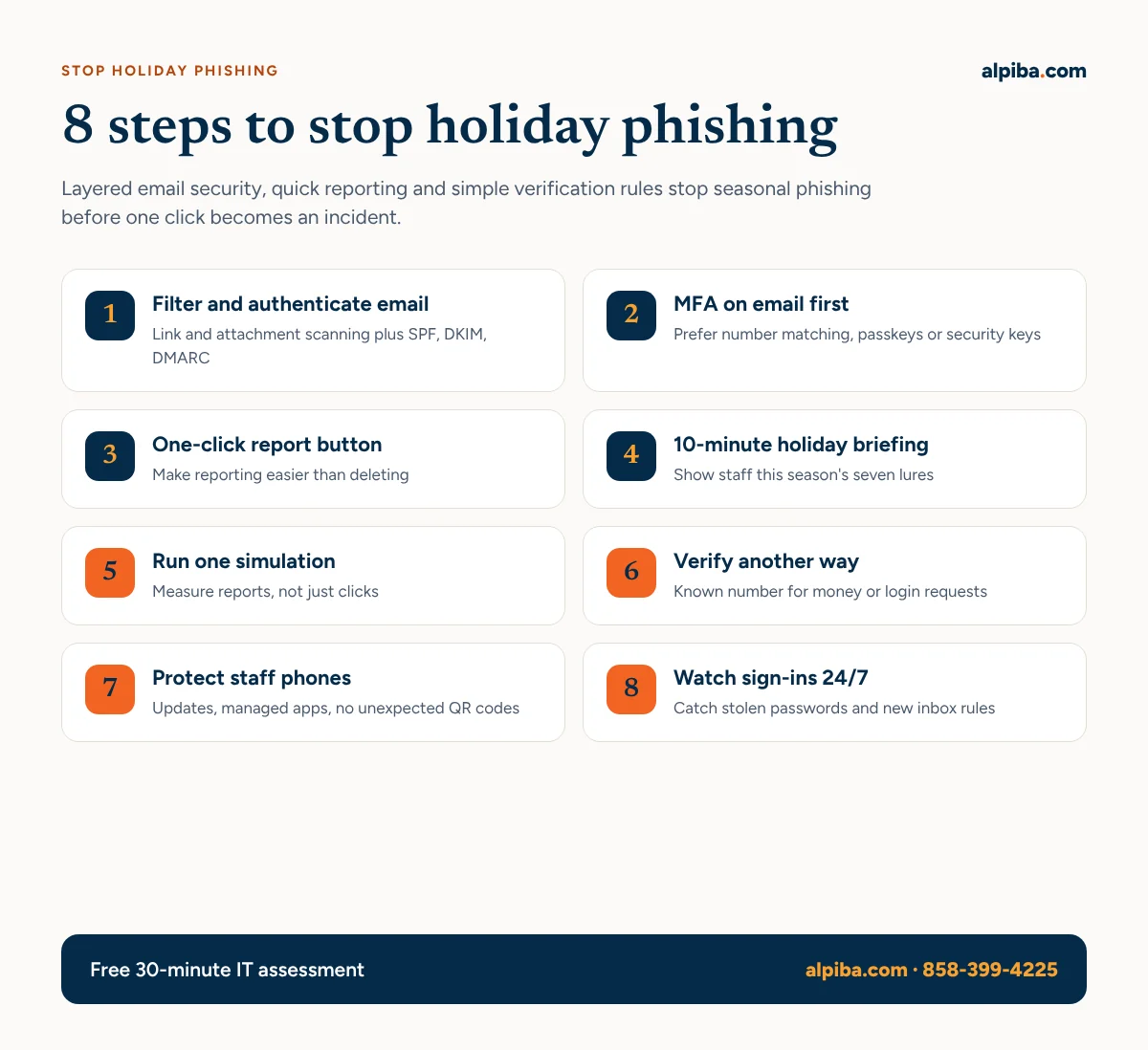
How to stop holiday phishing scams: an 8-step plan
No single tool catches everything. These steps layer technology, people and process.
1. Filter and authenticate email
Turn on link and attachment scanning and external-sender warnings in your Microsoft 365 or Google Workspace tenant (some features depend on your plan). Publish SPF, DKIM and DMARC records so criminals cannot easily send email as your domain; our IT and security glossary explains each term.
2. Put strong MFA on email first
A stolen password is far less useful when the attacker also needs a second factor. Prefer number-matching authenticator prompts, passkeys or security keys over text codes. Our Microsoft 365 security checklist covers MFA, conditional access and admin roles, and zero trust identity security adds checks on every sign-in.
3. Give everyone a one-click report button
Reporting should be easier than deleting. Microsoft documents a built-in Report button in Outlook that admins can route to a reporting mailbox, to Microsoft, or both; Gmail has its own report-phishing option. One report lets IT remove the same message from every inbox.
4. Run a 10-minute holiday briefing
Before Thanksgiving, walk staff through the seven lures above and the rule in step 6. Short and specific beats a long annual course. CISA’s recognize and report phishing page is a handy one-page handout, and it notes that polished grammar does not rule out phishing.
5. Send one realistic holiday simulation
Test with a fake delivery notice or bonus email in early December. Track how many people report it, not just who clicks, and coach rather than blame. Email security and awareness training can run simulations like this on a schedule.
6. Set a “verify another way” rule
Any message asking someone to pay, change bank or payroll details, buy gift cards, or sign in through a link gets checked through a separate channel: a phone number already on file, or a website typed by hand. The phishing and BEC defense kit includes a bank-change verification procedure you can adopt as written.
7. Protect the phones staff actually use
QR codes and texts land on phones, often personal ones. Three rules cover most of the risk:
- Keep phone operating systems current.
- Keep work email in managed apps.
- Never scan a QR code from an email.
8. Watch sign-ins and mailboxes 24/7
Some phish will get through. What matters is spotting a stolen password used at 11 p.m. on a Saturday, or a new inbox rule that hides replies. Managed detection and response puts human analysts on those alerts around the clock; here is why 24/7 monitoring matters for small businesses.
Give your team a written playbook
Our free phishing and BEC defense kit includes a bank-change verification procedure you can adopt today. Then score your security out of 100 with our 10-question health check.
What to do in the first hour after a click
A click is not a disaster if it is reported fast. Make sure every employee knows that telling IT immediately is the right move, even when embarrassed.
| When | What to do | Who |
|---|---|---|
| First 5 minutes | Disconnect the device from Wi-Fi, keep it powered on, and report the message. Do not delete it. | Employee |
| First 15 minutes | If a password was entered, reset it from a clean device, sign the account out everywhere and check MFA methods. | IT or provider |
| First hour | Review sign-in logs, inbox rules and forwarding; scan the device; remove the same message from other inboxes. | IT or SOC |
| Same day | If money or payment details were involved, call your bank. Follow your incident plan and insurer notification terms. | Owner, finance |
| That week | Debrief without blame, tune filters and share the lure with staff. | Office manager |
First-hour response timeline after a phishing click.
If the click led to malware rather than a fake login page, treat it as a possible ransomware precursor. Our ransomware defense playbook includes a printable first-hour response card, and our holiday IT preparation checklist covers who should be on call to make these calls over the holidays.
How Alpiba helps San Diego businesses stop phishing
Alpiba is a San Diego managed IT and cybersecurity provider supporting businesses from Kearny Mesa and UTC to Escondido. We secure Microsoft 365 and Google Workspace email, run awareness training, and back it with a human-staffed 24/7 SOC with an average first response under 15 minutes. Staff who report a suspicious message reach a senior engineer, not a call queue, through our white-glove helpdesk, for one flat per-user monthly price. See our cybersecurity and ransomware defense service, or how we support dental practices.
Questions
What are the most common holiday phishing scams targeting businesses?
The most common are fake delivery notices, fake invoices and purchase orders, fake e-signature requests, and fake HR bonus or benefits emails. QR-code phishing, scam texts and phone calls round out the list. All of them copy legitimate seasonal messages so they blend in.
How can I tell if a delivery notification is fake?
Assume it is fake if it asks for a fee, a login or personal details through a link. Do not click; check the order on the retailer's or carrier's own website, typed by hand. Real carriers rarely ask you to pay a small redelivery fee by text.
What is QR code phishing?
QR code phishing, sometimes called quishing, hides a malicious link in a QR code inside an email, PDF or printed notice. Scanning it on a phone can bypass your work email filters and open a fake sign-in page. Do not scan QR codes you were not expecting.
What should an employee do after clicking a phishing link?
Report it to IT immediately and disconnect the device from Wi-Fi without turning it off. If a password was entered, it should be reset from another device and all sessions signed out. Fast reporting matters far more than the click itself.
Why are phishing emails harder to spot now?
Generative AI lets criminals write clean, personalized messages quickly, so spelling mistakes are no longer a reliable warning sign. Focus on the request instead: unexpected urgency, a new payment detail, or a link to a sign-in page should always trigger a separate check.
Can Alpiba help protect my team from phishing?
Yes. Alpiba provides email security, awareness training and 24/7 security monitoring for San Diego businesses, with an average first response under 15 minutes for managed clients. Call 858-399-4225 or book a free assessment.
Busy season is phishing season. Be ready for both.
Book a free 30-minute assessment and a senior engineer will show you where a holiday phishing email could get through, and exactly how to close the gap.