

The best way to prevent website downtime Black Friday through Cyber Monday is to confirm your hosting can handle peak traffic, load test at least two weeks ahead, serve pages through a CDN with caching and DDoS protection, freeze plugin and code updates, monitor uptime and checkout around the clock, and keep a tested backup and rollback plan ready.
- Most Black Friday outages come from capacity limits, untested changes, expired certificates or third-party failures.
- Load test at least two weeks out so you have time to fix what breaks.
- A CDN with caching takes most of the load off your server and helps absorb attack traffic.
- Freeze plugin and code changes before the weekend, with a rehearsed rollback.
- Uptime alerts are useless unless a named person receives them and can act at 6 a.m.
It is 6:02 a.m. on Black Friday. Your promotional email went out two minutes ago, a few thousand people click at once, and your homepage starts timing out. By the time someone notices and calls the web developer, the busiest hour of your year is gone, along with the customers who gave up and bought elsewhere.
If you sell online, take bookings, or rely on your website for leads, you need a plan to prevent website downtime Black Friday through Cyber Monday. Most outages over that weekend are not mysterious. They come from predictable causes: undersized hosting, an untested plugin update, an expired certificate, a third-party service that slows down, or a flood of bot traffic.
This guide gives you ten practical steps, a three-week timeline and a short incident runbook. It pairs with our holiday cybersecurity checklist, which covers payment and fraud controls.
Why websites go down on Black Friday
Your website is a chain: domain, DNS, hosting, the application (WordPress, Shopify or custom code), its plugins, and outside services such as payments and shipping rates. On a normal day, weak links go unnoticed. On the busiest weekend of the year, traffic finds every one.
The common causes fall into five groups:
- Capacity: shared or entry-level hosting runs out of CPU, memory or database connections.
- Change: a plugin, theme or code update goes live the week of the sale and breaks checkout.
- Expiry: a domain, DNS service or SSL certificate lapses, and browsers block the site.
- Dependencies: a payment, shipping or review service slows down and takes your pages with it.
- Attack traffic: bots, scrapers or a distributed denial-of-service (DDoS) attack, which floods a site with junk requests from many machines.
Each hour offline costs more on this weekend than any other. Before you decide how much to invest, put a number on it with our downtime cost calculator.
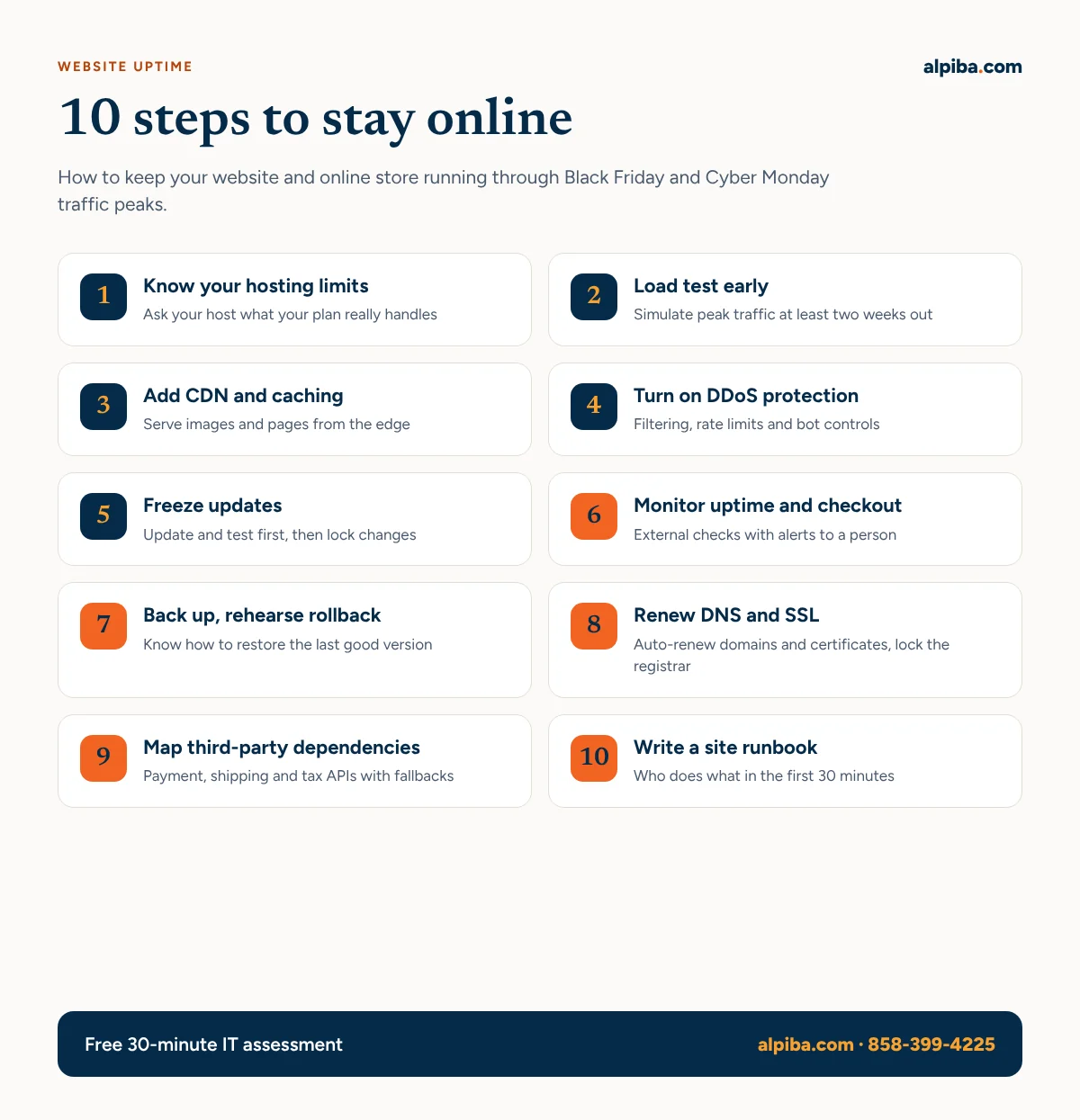
10 steps to prevent website downtime Black Friday through Cyber Monday
Steps 1–4 make the site strong enough for peak traffic, steps 5–8 remove the most common self-inflicted failures, and steps 9–10 prepare you for the things you cannot control.
1. Know your hosting limits
Ask your hosting provider, in writing, what your current plan can handle: concurrent visitors, CPU and memory limits, database connections, and what happens when you exceed them (throttling, extra charges or a hard stop). Compare that with last year’s peak. If the gap is uncomfortable, upgrade or enable autoscaling now, not on the day. Our IT procurement and vendor management team can handle those vendor conversations for you.
2. Load test at least two weeks out
Load testing means simulating many users at once to see where the site slows down or breaks. Test the real customer path, not just the homepage: browse, search, add to cart and reach the payment step (using test mode). Run it against a staging copy if you can, tell your host beforehand, and leave time to fix what you find.
3. Put a CDN and caching in front of the site
A content delivery network (CDN) is a network of servers around the world that keeps copies of your images, scripts and pages close to visitors. With good caching, most requests never reach your server, which is exactly what you want when traffic jumps tenfold. Cache product and category pages aggressively, but never cache cart, checkout or account pages.
4. Turn on DDoS protection and bot controls
The joint CISA, FBI and MS-ISAC guide, Understanding and Responding to Distributed Denial-of-Service Attacks, recommends engaging a DDoS mitigation provider that filters malicious traffic before it reaches you, planning capacity for spikes, applying rate limits, and using challenges such as CAPTCHA to screen out bots. Many CDNs include these features; make sure they are switched on, not just available. Protect login and checkout pages from automated card-testing and credential-stuffing attempts too.
5. Update first, then freeze
Apply platform, plugin and theme updates before your load test, test them on staging, and then freeze all non-emergency changes until after Cyber Monday. That includes new pop-ups and tracking scripts. Security fixes for actively exploited flaws are the exception; a vulnerability assessment helps you tell the difference, and our vulnerability management guide explains how to prioritize.
6. Monitor uptime and checkout, and alert a person
- Use an external monitoring service that checks the site from several locations every minute.
- Add a transaction check that walks through add-to-cart and reaches the payment step.
- Watch response times, not just up or down; a page that takes 12 seconds is effectively down.
- Send alerts by text or phone call to a named person on call, with a backup.
Security alerts deserve the same treatment. Our article on why small businesses need 24/7 cybersecurity monitoring explains why.
7. Back up the site and rehearse a rollback
Take a full backup of files and database before the freeze and keep a copy away from your host. Then rehearse the rollback: how long does restoring yesterday’s version take, and who can do it? For order data, agree on how often the database is backed up during the sale. Our backup and business continuity service and business continuity workbook cover the bigger picture.
8. Check DNS, domain and SSL renewals
Confirm your domain, DNS service and SSL/TLS certificates renew automatically and will not expire before January. Certificate lifetimes are shrinking: the CA/Browser Forum, which sets the rules for public certificates, approved Ballot SC-081v3, which cuts the maximum validity in stages starting in March 2026 and ending at 47 days in March 2029. Manual renewal will not keep up, so automate it. Turn on registrar lock and MFA for your registrar and DNS accounts.
9. Map your third-party dependencies
List every outside service your site calls (payments, shipping, tax, inventory, reviews, chat) with its status page, support contact and what happens if it is slow or down. Load non-essential scripts asynchronously so a slow chat widget cannot freeze checkout, and decide in advance whether you can switch to a backup payment method or flat-rate shipping. Our IT procurement and vendor toolkit helps you organize those contacts and SLAs.
10. Write a one-page site incident runbook
Write down who is on call each day of the weekend, how to reach your host, developer and payment provider, where the logins live (in a password manager, not a spreadsheet), and how to switch on a maintenance page. Print it. The next section gives you the first 30 minutes.
Will your systems hold up on Black Friday?
A senior Alpiba engineer will review your hosting setup, backups, monitoring and vendor dependencies, then give you a plain-English list of the weak links to fix before the weekend.
Website readiness timeline
Black Friday 2026 falls on November 27 and Cyber Monday on November 30. Here is a realistic schedule from today:
| When | What to do | Steps |
|---|---|---|
| This week (Nov 10–13) | Confirm hosting limits, apply updates on staging, map dependencies, schedule the load test | 1, 5, 9 |
| Next week (Nov 16–20) | Load test, fix bottlenecks, configure CDN, caching and DDoS protection, set up monitoring | 2, 3, 4, 6 |
| Week of the sale (Nov 23–25) | Back up, rehearse rollback, check renewals, start the change freeze, print the runbook | 5, 7, 8, 10 |
| Nov 27–30 | Watch dashboards, respond to alerts, no non-emergency changes | 6, 10 |
| Week after | Lift the freeze, review what slowed down, plan fixes for December | All |
Black Friday and Cyber Monday website readiness timeline.
Short on time? Prioritize steps 6, 7 and 8: monitoring, a tested rollback and renewals take hours, not weeks.
What would an hour offline cost you this weekend?
Move a few sliders and see your downtime cost in about a minute. Then use our business continuity workbook to plan how you would keep selling if a key system fails.
What to do if your site goes down anyway
Here is a simple first-30-minutes sequence for your runbook:
- Confirm the problem. Check from a phone on mobile data and from your monitoring dashboard, so you know it is not just the office network.
- Check the usual suspects. Host and CDN status pages, payment gateway status, and whether anything changed in the last 24 hours.
- Escalate fast. Call your host and developer; do not wait on email tickets during peak hours.
- Roll back if a change caused it. Restore the last known good version rather than debugging live.
- Talk to customers. Post a short status note on social media and extend promotions if needed.
- Look for an attack. If traffic looks abnormal, contact your DDoS or security provider, and treat any unexplained admin logins as a security incident.
Afterwards, write down what happened and what you will change. That review becomes part of your holiday IT plan for next year and feeds your IT roadmap and budget.
How Alpiba helps San Diego businesses stay online
Alpiba is a San Diego managed IT and cybersecurity provider working with businesses in UTC, Carlsbad and Oceanside, from software companies to manufacturers and distributors with online ordering. We provide network and server consulting, immutable backups tested quarterly, and a human-staffed 24/7 security operations center with an average first response under 15 minutes. When you call, you reach a senior engineer, not a queue, and everything comes at one flat per-user monthly price. See our managed IT and white-glove support or, if you have in-house IT, co-managed IT.
Questions
How do I prevent my website from crashing on Black Friday?
Confirm your hosting capacity, load test the full checkout path weeks in advance, and put a CDN with caching in front of the site. Then freeze changes before the sale and make sure a named person gets uptime alerts and can roll back quickly.
How far in advance should I load test my website?
Aim for at least two weeks before Black Friday, and earlier if you can. That leaves time to upgrade hosting, fix slow pages and re-test before your change freeze begins.
Does a CDN protect against DDoS attacks?
Partly. A CDN spreads load across many servers, and many CDN vendors offer DDoS mitigation and web application firewalls as added services. Check that those protections are actually enabled on your plan.
Should I update WordPress plugins before Black Friday?
Yes, but early. Apply and test updates before your load test, at least two weeks before the sale, then freeze. Only apply urgent security fixes during the freeze, and test them on staging first if you possibly can.
What should I monitor on my website during Cyber Monday?
Monitor availability from several locations, page response times, and a transaction check that reaches the payment step. Also watch error rates, payment gateway status and unusual admin logins, and route alerts to a person on call.
Can Alpiba help prepare our systems for Black Friday?
Yes. Alpiba offers network and server consulting, tested immutable backups and 24/7 security monitoring with an average first response under 15 minutes. Call 858-399-4225 to reach a senior engineer, or book a free assessment.
Your busiest weekend should not be your worst.
Book a free 30-minute readiness review with a senior engineer. We will help you find the weak links before Black Friday finds them for you.